
3
VIEWS
·
1
COPIES
·
1
LIKES
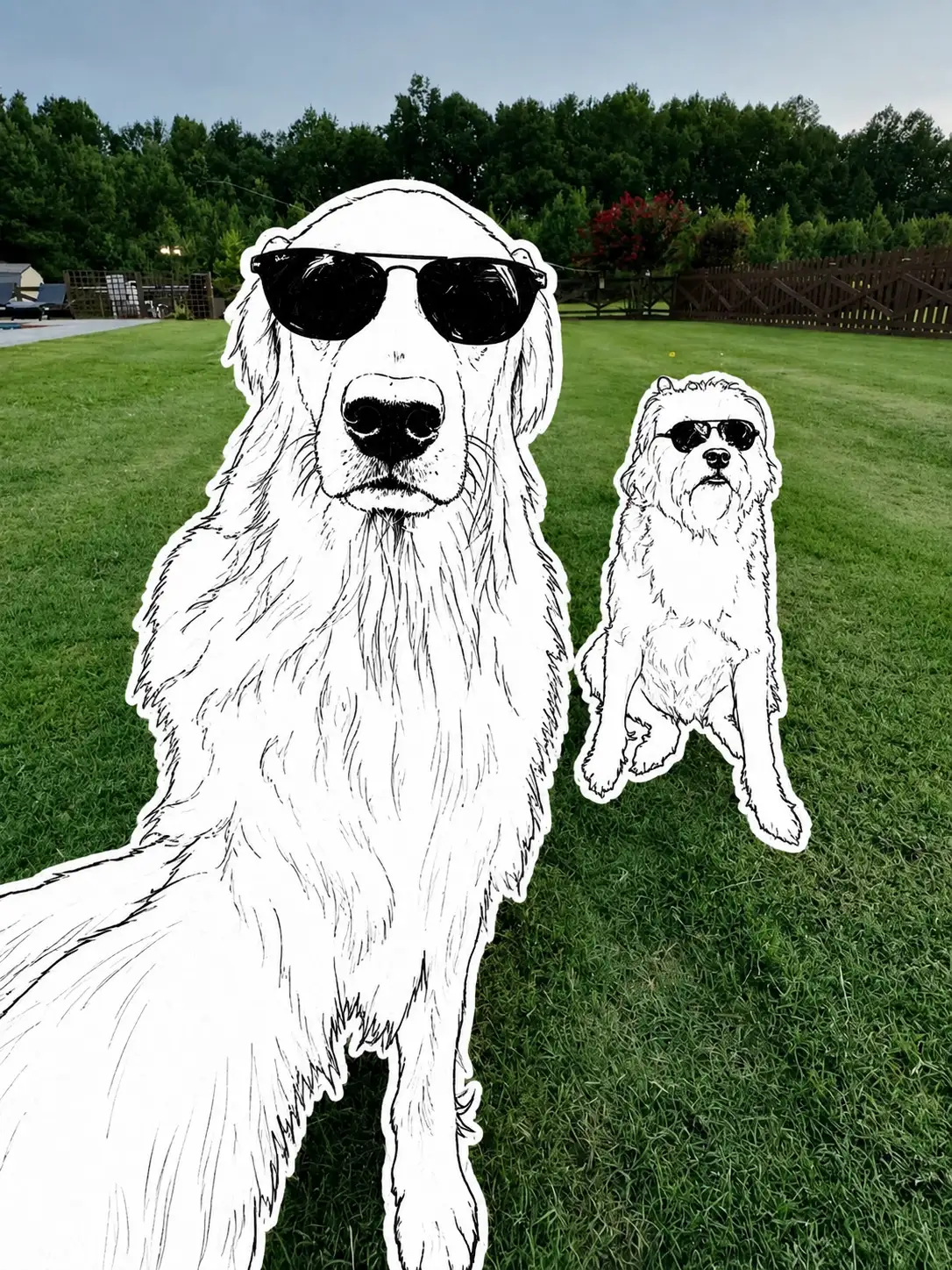
Real Photo + Hand-Drawn Sticker
Preserve the original photograph with 100% scene, composition, perspective, lighting, and spatial accuracy. Do not alter, redraw, replace, crop, or reinterpret the real background. Keep the exact lawn, trees, wooden fence, buildings, sky, environmental details, natural light, shadows, photographic textures, camera angle, lens perspective, depth, and framing exactly as in the original image.Replace only the two dogs with minimalist black-and-white hand-drawn sticker illustrations.ABSOLUTE CHARACTER & FACE ACCURACY LOCKPreserve the exact identity and facial characteristics of both dogs from the reference image with maximum possible accuracy. Do not change their breed appearance, head shape, muzzle proportions, nose shape, eye placement, ear position, fur silhouette, body proportions, pose, posture, size relationship, direction, or expression.The large golden dog must remain in the exact foreground position, scale, sitting/standing posture, body orientation, head angle, and sunglasses placement from the original. The smaller white dog must remain in the exact background position, scale, sitting posture, orientation, head angle, and sunglasses placement.Do not invent new facial features. Do not beautify, exaggerate, stylize, deform, anthropomorphize, or change the dogs' faces. The dogs must remain immediately recognizable from their original facial structure and silhouette.Render the dogs as flat 2D black-and-white illustrations, using only pure black and pure white. No gray, color, gradients, shading, or realistic fur coloring.Use rough, imperfect, hand-drawn one-line illustration strokes with natural irregularities. Simplify the fur, facial features, sunglasses, paws, ears, muzzle, and body using expressive black linework. Use only a small amount of solid black fill for sunglasses, noses, selected shadows, and important dark details.Add a clean white sticker outline around each dog, creating a hand-cut collage appearance. The white border should clearly separate the illustrated dogs from the realistic photographic background.The final image should look like real reportage photography combined with pasted black-and-white graffiti/sketch stickers, while keeping the original photograph completely intact.Style: minimalist graffiti, hand-drawn ink sketch, black-and-white sticker, editorial collage, paper cutout, mixed-media photography, rough one-line illustration.Quality: ultra-sharp, high-definition, detailed linework, realistic photographic background, natural outdoor lighting, authentic photographic texture, clean sticker edges, 8K visual quality.Aspect ratio: 3:4 or 9:16, matching the original composition without changing the camera perspective.Negative instructions: no background replacement, no new objects, no altered environment, no changed camera angle, no realistic illustrated background, no color on dogs, no gray tones, no gradients, no extra characters, no changed poses, no changed proportions, no distorted faces, no exaggerated features, no cartoon-style redesign.
Open with:
Share this prompt
3
VIEWS
·
1
COPIES
·
1
LIKES
Log in to leave a comment.
More Like This
See all →
How to use this prompt
Want a fast “Real Photo + Hand-Drawn Sticker” result? This Image AI Prompts prompt is set up for Gemini. It’s tuned to give a repeatable, high-detail image you can refine. What sets this one apart is how it handles must remain.
- Tap Copy above to grab the full prompt.
- Open Gemini (or any image AI like Midjourney, DALL·E 3 or Gemini).
- Paste the prompt into the generate box and run it.
- Like the result? Re-roll once or twice and keep your favourite.
Tips & variations
- Save a version you like as a template, then only edit the subject line each time.
- Swap the main subject for your own to completely change the scene while keeping the style.
- Add an aspect ratio that fits your platform — portrait for Instagram, wide for banners.
Frequently asked questions
It’s set up for Gemini, and it also works well in Midjourney, DALL·E 3 or Gemini. Image models vary, so try the same prompt in a couple of tools and keep the result you like best.
Edit the descriptive words in the prompt — change must remain, the lighting, the colours or the setting. Small wording changes produce big differences in the final image.
Yes — treat it as a starting point. Once you have an output you like, you can feed it back in with a follow-up prompt to refine or extend it further.
Yes — every prompt on the site is free to copy and use. You only need an account with the AI tool you choose to run it.