
11
VIEWS
·
0
COPIES
·
1
LIKES
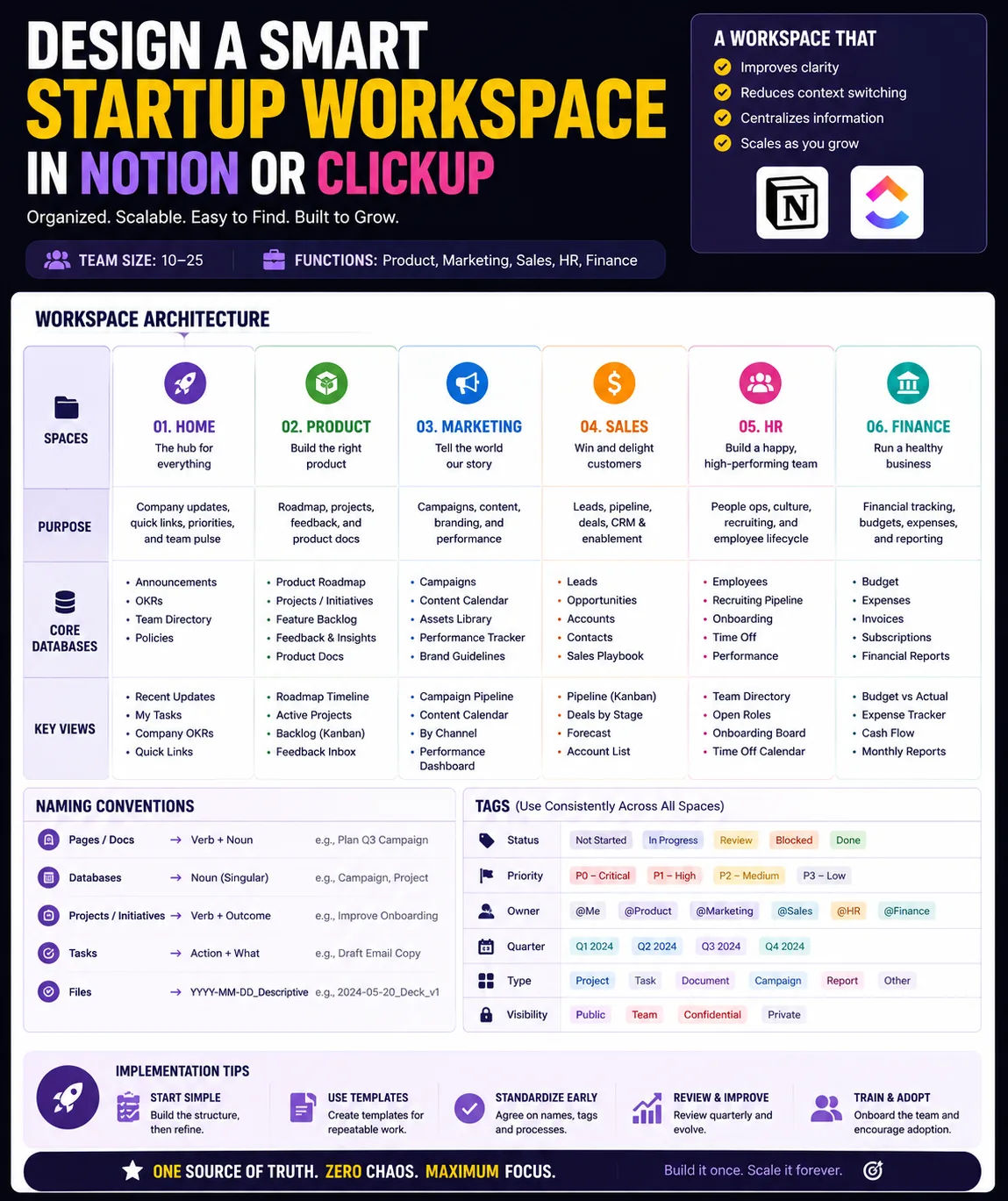
Notion/ClickUp Workspace Blueprint
Design an information architecture for a startup’s workspace in Notion or ClickUp. Given team size and functions, recommend spaces, databases, and key views for product, marketing, sales, HR, and finance. Include naming conventions and tags.
Share this prompt
11
VIEWS
·
0
COPIES
·
1
LIKES

Log in to leave a comment.
More Like This
See all →




How to use this prompt
“Notion/ClickUp Workspace Blueprint” is a ready-to-use Business & Startups prompt built for ChatGPT. Drop it in and adjust the details to make the result your own. This version leans on information architecture, which gives the result its character.
- Grab the prompt with the Copy button at the top.
- Paste it into ChatGPT.
- Run it, focusing on information architecture if you want to steer the result.
- Regenerate to explore a few different takes on the same idea.
Tips & variations
- Replace the setting or background to repurpose the same prompt for a new theme.
- Try the prompt with and without the style words to see how much they’re actually doing.
- Add an aspect ratio that fits your platform — portrait for Instagram, wide for banners.
Frequently asked questions
The way it handles information architecture is fairly specific, so results tend to be more focused than a generic Business & Startups prompt.
Edit the descriptive words in the prompt — change information architecture, the lighting, the colours or the setting. Small wording changes produce big differences in the final image.
It’s set up for ChatGPT, and it also works well in Midjourney, DALL·E 3 or Gemini. Image models vary, so try the same prompt in a couple of tools and keep the result you like best.
No — the prompt itself works on free tiers of ChatGPT. A paid plan may unlock faster generation, higher limits, or commercial licensing, depending on the tool.