
25
VIEWS
·
43
COPIES
·
1
LIKES
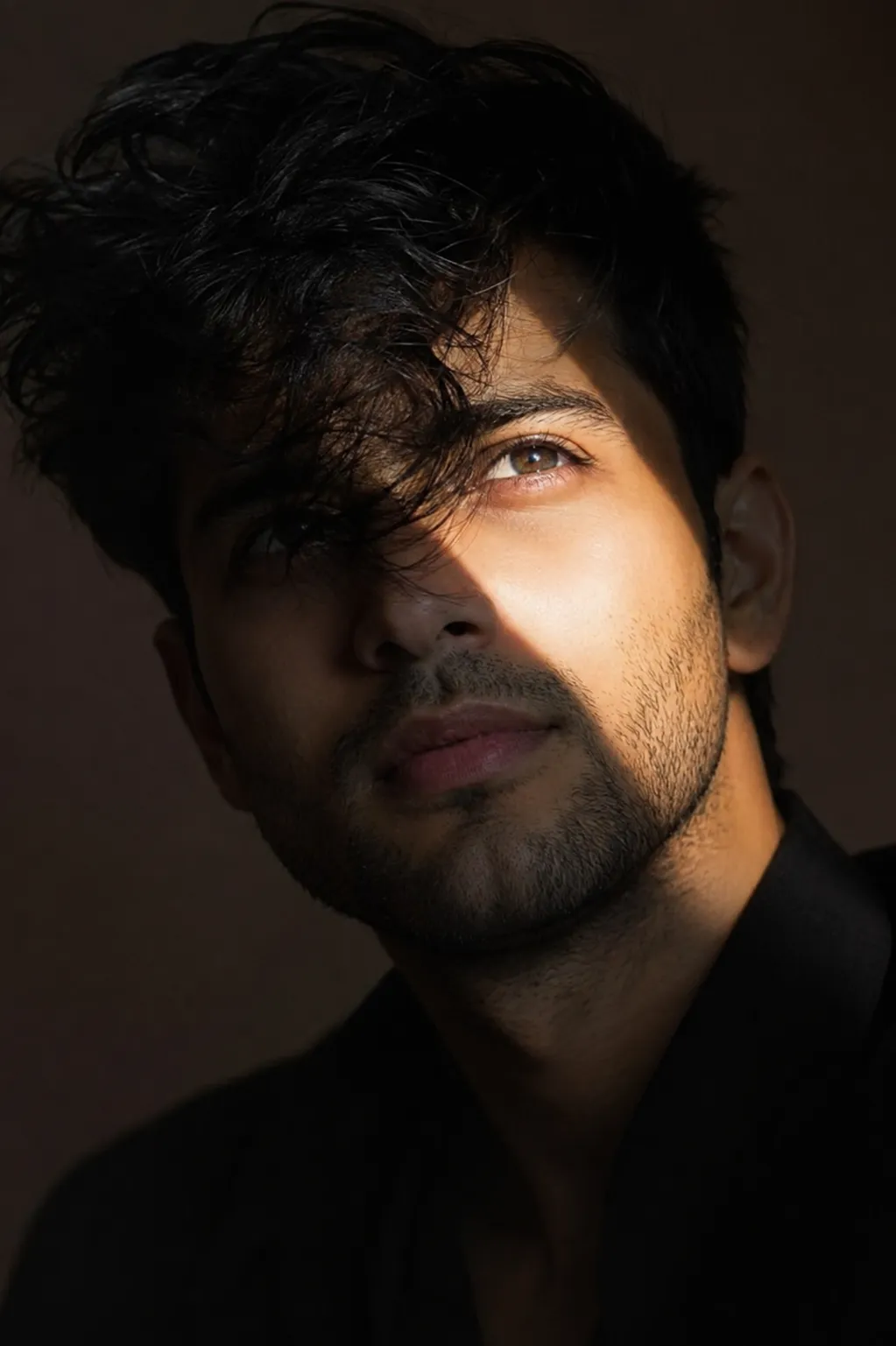
Chiaroscuro Portrait with Dramatic Diagonal Light
Use the uploaded image as the identity reference and preserve the subject's face with maximum fidelity. Create an 8K ultra-realistic cinematic close-up portrait of the same young South Asian man, maintaining 100% facial identity including exact face shape, jawline, forehead proportions, eyebrows, eye shape and spacing, iris color, nose structure, lips, skin tone, beard density, hairline, ears, and overall facial proportions. Do not beautify, alter, age, or stylize the face. Identity preservation is the highest priority.Style his thick black hair as naturally windswept, with a few loose strands partially covering one eye. He wears a simple black outfit that blends into the shadows. His head is slightly tilted upward with an elevated, thoughtful gaze. A sharp diagonal beam of natural sunlight cuts across his face, illuminating one eye, cheekbone, nose bridge, and lips while the rest of his face and surroundings remain immersed in deep cinematic shadows. Emphasize realistic skin texture, subtle pores, natural beard stubble, high cheekbones, soft natural lip color, catchlight in the illuminated eye, and dramatic chiaroscuro lighting. Dark minimalist background, editorial fashion photography, moody atmosphere, ultra-detailed, HDR, shallow depth of field, 85mm lens, f/1.4, razor-sharp focus on the face, premium magazine-quality color grading, photorealistic, masterpiece.Negative Prompt: low quality, blurry, cartoon, CGI, AI artifacts, oversmoothing, beauty filter, altered facial structure, different person, asymmetrical eyes, deformed facial features, extra facial hair, unrealistic skin, duplicate face, low resolution, noise, watermark, text, logo, cropped face.
Open with:
Share this prompt
25
VIEWS
·
43
COPIES
·
1
LIKES
Log in to leave a comment.
More Like This
See all →
How to use this prompt
Here’s a shortcut to “Chiaroscuro Portrait with Dramatic Diagonal Light” — no prompt-writing experience required. It’s tuned to give a repeatable, high-detail image you can refine. What sets this one apart is how it handles one eye.
- Use the Copy button to copy the prompt text.
- Head to ChatGPT and start a new image.
- Set your preferred aspect ratio, then generate.
- Download the version you like and share it.
Tips & variations
- Add an aspect ratio that fits your platform — portrait for Instagram, wide for banners.
- Replace the setting or background to repurpose the same prompt for a new theme.
- Save a version you like as a template, then only edit the subject line each time.
Frequently asked questions
AI models are non-deterministic, so results vary each run even with the same prompt. Generate a few times and pick your favourite, or lock a seed if your tool supports it.
Yes — every prompt on the site is free to copy and use. You only need an account with the AI tool you choose to run it.
Yes — treat it as a starting point. Once you have an output you like, you can feed it back in with a follow-up prompt to refine or extend it further.
Edit the descriptive words in the prompt — change one eye, the lighting, the colours or the setting. Small wording changes produce big differences in the final image.