
203
VIEWS
·
58
COPIES
·
0
LIKES
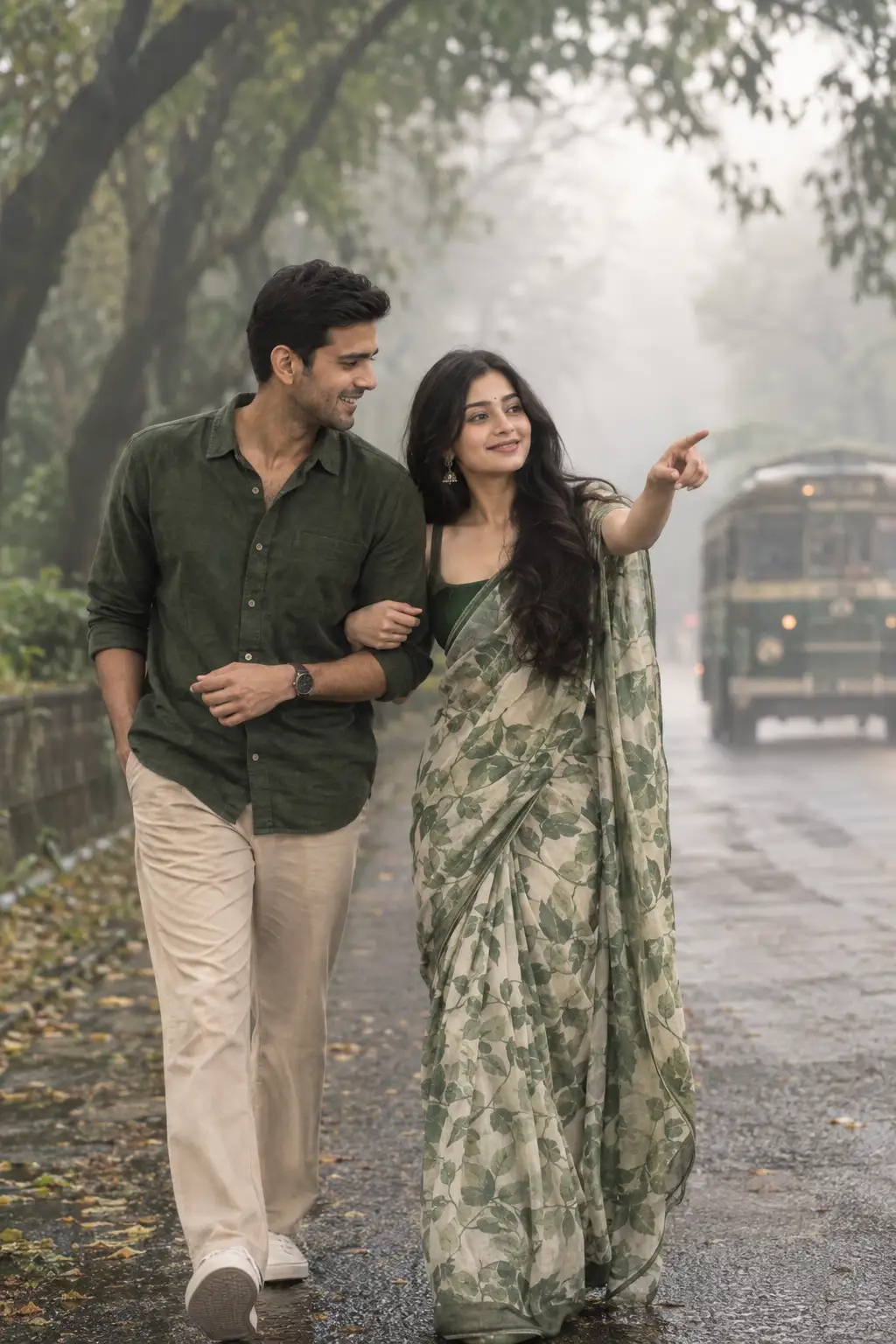
Monsoon Couple Walk — Cinematic Romantic Portrait
Use the uploaded reference images as the facial identity references for both individuals. Preserve their natural facial features, facial structure, skin tone, proportions, hairstyle characteristics, and overall recognizable appearance accurately while creating a completely new scene.Create a single full-body cinematic photograph of the couple walking arm-in-arm along a beautiful foggy, tree-lined avenue during the monsoon season. The woman is wearing an elegant green leaf-print saree, with the saree draped naturally and realistically around her body. She is smiling brightly and pointing ahead with one hand, creating a spontaneous, playful gesture. The man walks beside her wearing a simple green shirt with beige trousers, laughing naturally at her gesture.Capture them in a candid mid-stride moment, with relaxed body language and genuine interaction between the couple. Their hands, arms, fingers, posture and clothing should appear anatomically natural and realistic.The avenue is surrounded by tall lush green trees, with dense foliage fading naturally into the mist. A vintage bus appears softly blurred in the distant background, adding depth and nostalgic character without distracting from the couple. The ground and surroundings should have subtle monsoon moisture and a fresh atmospheric feel.Use soft misty morning light, gentle diffused highlights, subtle atmospheric haze, natural shadows and a muted monsoon color palette. Create realistic depth separation between the foreground couple and the foggy background.Photography style: ultra-realistic professional photography, Sony Alpha 1 aesthetic, 85mm portrait lens, f/1.4, shallow depth of field, cinematic compression, realistic bokeh, natural skin pores and texture, individual hair strands, realistic fabric texture, authentic saree folds, physically accurate lighting, subtle film grain, high dynamic range, extremely detailed but natural.Composition: vertical 4:6 aspect ratio, full-body framing, couple clearly visible from head to toe, slightly cinematic eye-level perspective, natural walking composition, balanced negative space, soft background blur.Important: Preserve the identities from the uploaded references without making them look like different people. Keep their expressions natural and candid. No illustration, no painting, no anime, no 3D render, no CGI, no plastic skin, no excessive beauty retouching, no distorted anatomy, no extra fingers, no malformed hands, no duplicate limbs, no artificial-looking faces.
Open with:
Share this prompt
203
VIEWS
·
58
COPIES
·
0
LIKES

Log in to leave a comment.
More Like This
See all →
How to use this prompt
Want a fast “Monsoon Couple Walk — Cinematic Romantic Portrait” result? This Image AI Prompts prompt is set up for ChatGPT. Generate, tweak a few words, and re-roll until it’s exactly right.
- Tap Copy above to grab the full prompt.
- Open ChatGPT (or any image AI like Midjourney, DALL·E 3 or Gemini).
- Paste the prompt into the generate box and run it.
- Like the result? Re-roll once or twice and keep your favourite.
Tips & variations
- Replace the setting or background to repurpose the same prompt for a new theme.
- Push or pull the uploaded reference elements specifically — that’s usually the fastest lever here.
- Try the prompt with and without the style words to see how much they’re actually doing.
Frequently asked questions
It generates a visual built around uploaded reference — part of our Image AI Prompts collection. Use it as-is or as a starting point you customise to taste.
AI models are non-deterministic, so results vary each run even with the same prompt. Generate a few times and pick your favourite, or lock a seed if your tool supports it.
It’s set up for ChatGPT, and it also works well in Midjourney, DALL·E 3 or Gemini. Image models vary, so try the same prompt in a couple of tools and keep the result you like best.
Edit the descriptive words in the prompt — change uploaded reference, the lighting, the colours or the setting. Small wording changes produce big differences in the final image.