
1
VIEWS
·
0
COPIES
·
0
LIKES
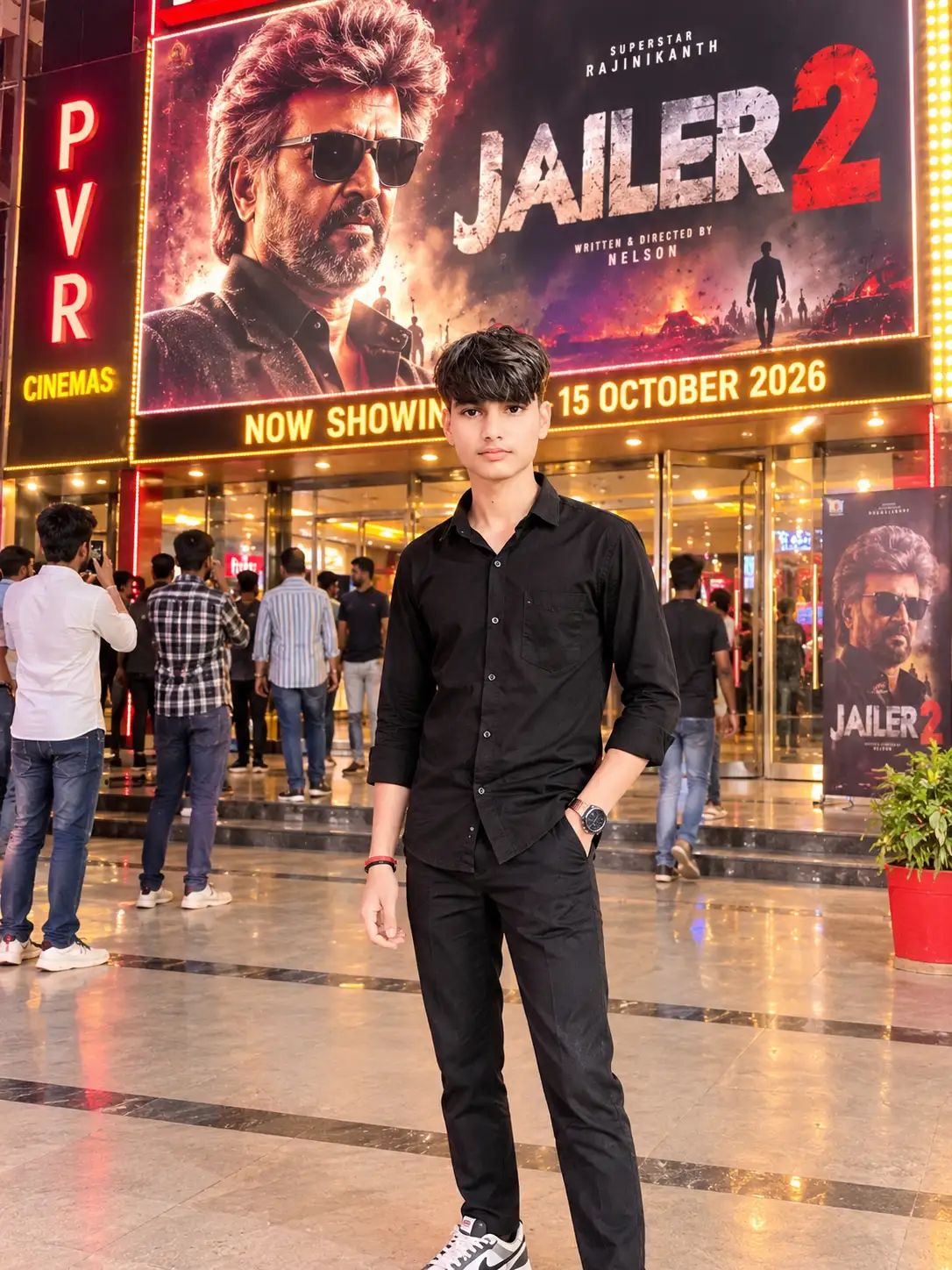
Create an ultra-realistic, cinematic DSLR photograph using the uploaded image as
Create an ultra-realistic, cinematic DSLR photograph using the uploaded image as the face reference. Show the same boy or man from the uploaded photo standing confidently outside an Indian cinema hall on 15 October 2026, in front of a huge, illuminated Jailer 2 movie promotional poster.STRICT FACE IDENTITY LOCK: Preserve the exact face from the uploaded reference image, including facial structure, skin tone, hairstyle, eyes, eyebrows, nose, lips, beard, and natural expression. Do not beautify, reshape, replace, or alter the person's identity.SCENE AND BACKGROUND: A realistic Indian cinema entrance at night, with a large Jailer 2 promotional poster on an illuminated LED billboard behind the person. Include glass entrance doors, glowing theatre signage, cinematic red and golden lights, subtle reflections, and a few moviegoers in the background. Create the atmosphere of an exciting movie release day.POSE AND OUTFIT: The person stands naturally facing the camera with a confident expression. One hand is casually placed inside a trouser pocket, while the other hangs naturally by the side. Dress him in a stylish black shirt, fitted dark trousers, and fashionable sneakers. Adjust his height, body proportions, and size naturally to match the cinema background.MOVIE POSTER: Display the title “JAILER 2” prominently on a dramatic action-movie poster featuring smoky textures, dark tones, red highlights, golden lighting, and bold cinematic typography. Add a realistic theatre banner reading “NOW SHOWING — 15 OCTOBER 2026.” Ensure the text is clear and correctly spelled.PHOTOGRAPHY AND QUALITY: Professional DSLR photography, 85mm lens aesthetic, realistic skin texture, sharp facial details, natural body proportions, accurate perspective, realistic shadows, balanced exposure, high dynamic range, and cinematic color grading.STRICT REALISM: Do not change the original face. Avoid distorted hands, extra fingers, artificial skin, unnatural proportions, floating feet, blurry facial details, and cartoon effects. Blend the person naturally into the scene.COMPOSITION: Vertical 3:4 portrait orientation, full-body framing, with both the person and the Jailer 2 poster clearly visible.FINAL RESULT: A photorealistic, professional-looking photograph of the person visiting an Indian cinema hall during the Jailer 2 release-day celebrations on 15 October 2026.
Also try in:
Did this prompt work for you?
Share this prompt
1
VIEWS
·
0
COPIES
·
0
LIKES

Log in to leave a comment.
More Like This
See all →
How to use this prompt
Here’s a shortcut to “Create an ultra-realistic, cinematic DSLR photograph using the uploaded image as” — no prompt-writing experience required. Generate, tweak a few words, and re-roll until it’s exactly right.
- Use the Copy button to copy the prompt text.
- Head to Lokesh and start a new image.
- Set your preferred aspect ratio, then generate.
- Download the version you like and share it.
Tips & variations
- Replace the setting or background to repurpose the same prompt for a new theme.
- Name a colour palette to keep a series of images visually consistent.
- Swap the main subject for your own to completely change the scene while keeping the style.
Frequently asked questions
Edit the descriptive words in the prompt — change indian cinema, the lighting, the colours or the setting. Small wording changes produce big differences in the final image.
AI models are non-deterministic, so results vary each run even with the same prompt. Generate a few times and pick your favourite, or lock a seed if your tool supports it.
It generates a visual built around indian cinema — part of our Wallpaper prompt collection. Use it as-is or as a starting point you customise to taste.
Yes — treat it as a starting point. Once you have an output you like, you can feed it back in with a follow-up prompt to refine or extend it further.