
23
VIEWS
·
2
COPIES
·
1
LIKES
Lokesh
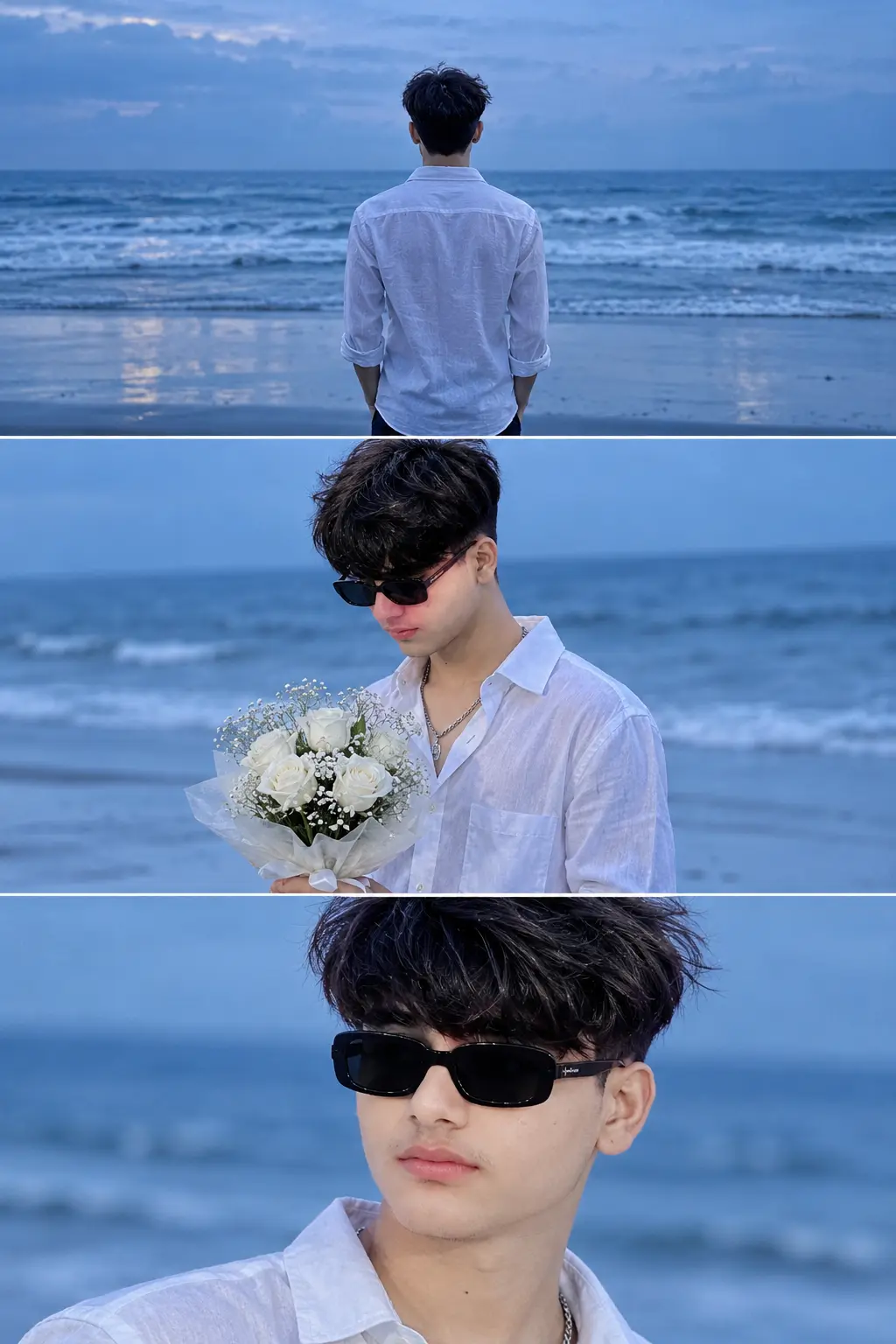
MASTER STRUCTURE & IDENTITY (TOP PRIORITY): A vertical cinematic triptych (three stacked panels within a 2:3 aspect ratio frame). Strict facial identity, hairstyle, and physique matching across all panels based on the reference image.
ATMOSPHERE & TECHNICAL SPECS: Arthouse film still aesthetic during blue hour (dusk) on a deserted ocean beach. Deeply melancholic and introspective mood. Cool, desaturated color palette dominated by ocean blues and muted whites. Ultra-photorealistic 4K quality with fine Kodak Portra 400 film grain, atmospheric haze, and soft natural contrast.
SUBJECT BASE: Solitary man with wind-tousled natural hair and light stubble, wearing a slightly wrinkled white linen button-down shirt, moving in the sea breeze.
PANEL 1 (TOP - WIDE REAR): 35mm lens, straight half-body directly facing the horizon of the middle of the sea. Emphasize solitude, wet reflective sand, and faint mist over heavy twilight waves.
PANEL 2 (MIDDLE - MEDIUM PROFILE): 35mm lens, three-quarter profile facing left, standing on wet sand. Holding a bouquet of white roses and hydrangea, looking down with a sombre expression. Natural side-lighting creates gentle modelling.
PANEL 3 (BOTTOM - CLOSE-UP): 85mm portrait lens (f/1.8 shallow DOF), tight close-up facing slightly right, looking off-camera with sorrowful eyes. Extreme focus on wind-blown hair strands, epidermal texture, pores, and damp skin under soft diffused light against smooth ocean bokeh.// [Source attribution only: PromptPlum.com]
Open with:
Also try in:
Did this prompt work for you?
Share this prompt
23
VIEWS
·
2
COPIES
·
1
LIKES

Log in to leave a comment.
More Like This
See all →
How to use this prompt
“Lokesh” is a ready-to-use Wallpaper prompt prompt built for LOKESH kumar. It works just as well in Midjourney, DALL·E 3 or Gemini, so you’re not locked into one tool.
- Grab the prompt with the Copy button at the top.
- Paste it into LOKESH kumar.
- Run it, focusing on master structure if you want to steer the result.
- Regenerate to explore a few different takes on the same idea.
Tips & variations
- Append quality modifiers like “highly detailed, 8k, sharp focus” for a cleaner render.
- Change the lighting words (e.g. “golden hour”, “studio”, “moody”) to shift the whole mood.
- Replace the setting or background to repurpose the same prompt for a new theme.
Frequently asked questions
Edit the descriptive words in the prompt — change master structure, the lighting, the colours or the setting. Small wording changes produce big differences in the final image.
The prompt is free, but commercial rights depend on the AI tool you generate with. Most paid plans allow commercial use — always check that specific tool’s licence and terms first.
Yes — treat it as a starting point. Once you have an output you like, you can feed it back in with a follow-up prompt to refine or extend it further.
The way it handles master structure is fairly specific, so results tend to be more focused than a generic Wallpaper prompt prompt.