
46
VIEWS
·
93
COPIES
·
1
LIKES
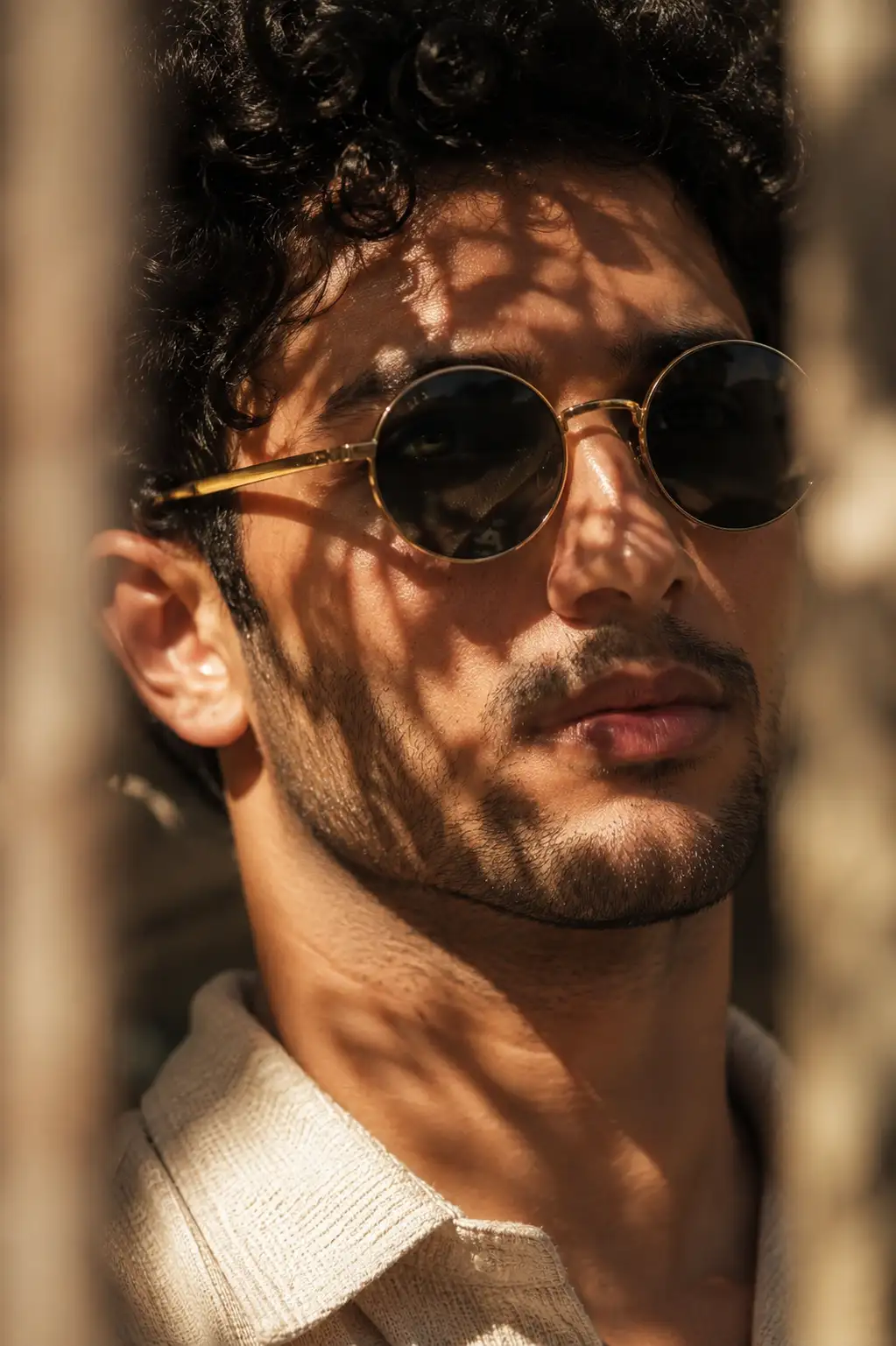
Dappled Shadows Portrait with Vintage Round Sunglasses
Use the uploaded reference image as the only identity source. Preserve the person's facial identity with maximum accuracy, including exact face shape, jawline, cheekbone structure, forehead proportions, eyebrows, eye shape and spacing, nose width and bridge, lips, skin tone, hairline, ears, beard density, mustache, subtle goatee, and natural facial proportions. Do not beautify, age, stylize, or alter the person's identity in any way.Create a hyper-realistic 8K close-up portrait of the same young man with naturally styled curly dark hair, a light mustache, and a subtle goatee. He is wearing vintage round metal-framed sunglasses with thin gold arms and dark lenses. Dramatic golden-hour sunlight filters through tree leaves, casting intricate dappled leaf shadows across his forehead, cheeks, and neck. Soft blurred vertical foreground elements partially frame the portrait, creating cinematic depth and a natural voyeuristic composition. Warm cinematic color grading, rich contrast, ultra-detailed skin texture with visible pores, realistic facial hair, soft natural expression, shallow depth of field, creamy bokeh, captured on an 85mm f/1.4 lens, editorial National Geographic-style photography, photorealistic, HDR, octane render quality, ultra-sharp focus on the face, premium color science, true-to-life lighting, 8K resolution.
Open with:
Share this prompt
46
VIEWS
·
93
COPIES
·
1
LIKES

Log in to leave a comment.
More Like This
See all →
How to use this prompt
Here’s a shortcut to “Dappled Shadows Portrait with Vintage Round Sunglasses” — no prompt-writing experience required. It’s tuned to give a repeatable, high-detail image you can refine. What sets this one apart is how it handles subtle goatee.
- Use the Copy button to copy the prompt text.
- Head to ChatGPT and start a new image.
- Set your preferred aspect ratio, then generate.
- Download the version you like and share it.
Tips & variations
- Replace the setting or background to repurpose the same prompt for a new theme.
- Change the lighting words (e.g. “golden hour”, “studio”, “moody”) to shift the whole mood.
- Swap the main subject for your own to completely change the scene while keeping the style.
Frequently asked questions
It’s set up for ChatGPT, and it also works well in Midjourney, DALL·E 3 or Gemini. Image models vary, so try the same prompt in a couple of tools and keep the result you like best.
The way it handles subtle goatee is fairly specific, so results tend to be more focused than a generic Image AI Prompts prompt.
The prompt is free, but commercial rights depend on the AI tool you generate with. Most paid plans allow commercial use — always check that specific tool’s licence and terms first.
Edit the descriptive words in the prompt — change subtle goatee, the lighting, the colours or the setting. Small wording changes produce big differences in the final image.