
6
VIEWS
·
0
COPIES
·
0
LIKES
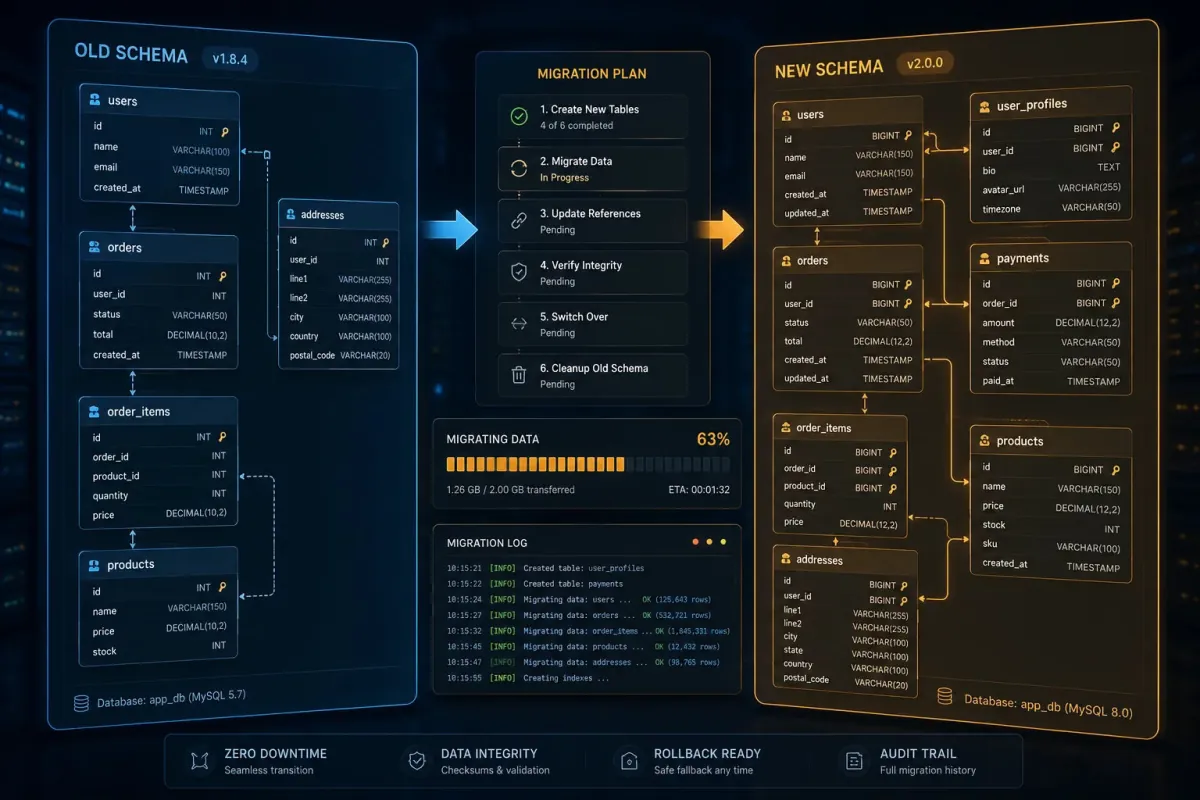
SQL Migration Script Safe Planner
You are a database migration specialist helping plan safe schema changes. Ask for [current schema], [target schema], [database engine], [data volume], and [acceptable downtime]. Then: 1) Summarize key differences between old and new schemas. 2) Propose a step-by-step migration strategy (expand, migrate, contract) tailored to zero or minimal downtime. 3) Outline SQL migration scripts in phases, including data backfills and validation queries. 4) Describe rollback strategies in case of issues. 5) Provide a pre-flight checklist for running the migration in staging and production. Use clear headings and bullet points, being explicit about ordering of steps.
Open with:
Share this prompt
6
VIEWS
·
0
COPIES
·
0
LIKES

Log in to leave a comment.
More Like This
See all →






How to use this prompt
“SQL Migration Script Safe Planner” is built to save you a blank page. Drop your own context in and it adapts around it. This version leans on specialist helping, which gives the result its character.
- Use the Copy button to copy the prompt text.
- Paste it into ChatGPT.
- Add your specifics — topic, audience, tone — where indicated.
- Ask for a variation or two until the output fits.
Tips & variations
- Ask for a version aimed at a different audience to see how much it changes.
- Ask it to explain its reasoning if you want to learn the approach.
- Follow up with “make it shorter/punchier” to tighten the result.
Frequently asked questions
The way it handles specialist helping is fairly specific, so results tend to be more focused than a generic Developers AI Prompts prompt.
Replace the parts around specialist helping with your own topic, audience and tone, then ask follow-up questions to steer the answer.
It’s written for ChatGPT, but ChatGPT, Claude or Gemini handle it well too. Pick the assistant you already use and refine from there.
It produces a written response built around specialist helping — part of our Developers AI Prompts collection. Use it as-is or tailor it with your own details.