
7
VIEWS
·
1
COPIES
·
1
LIKES
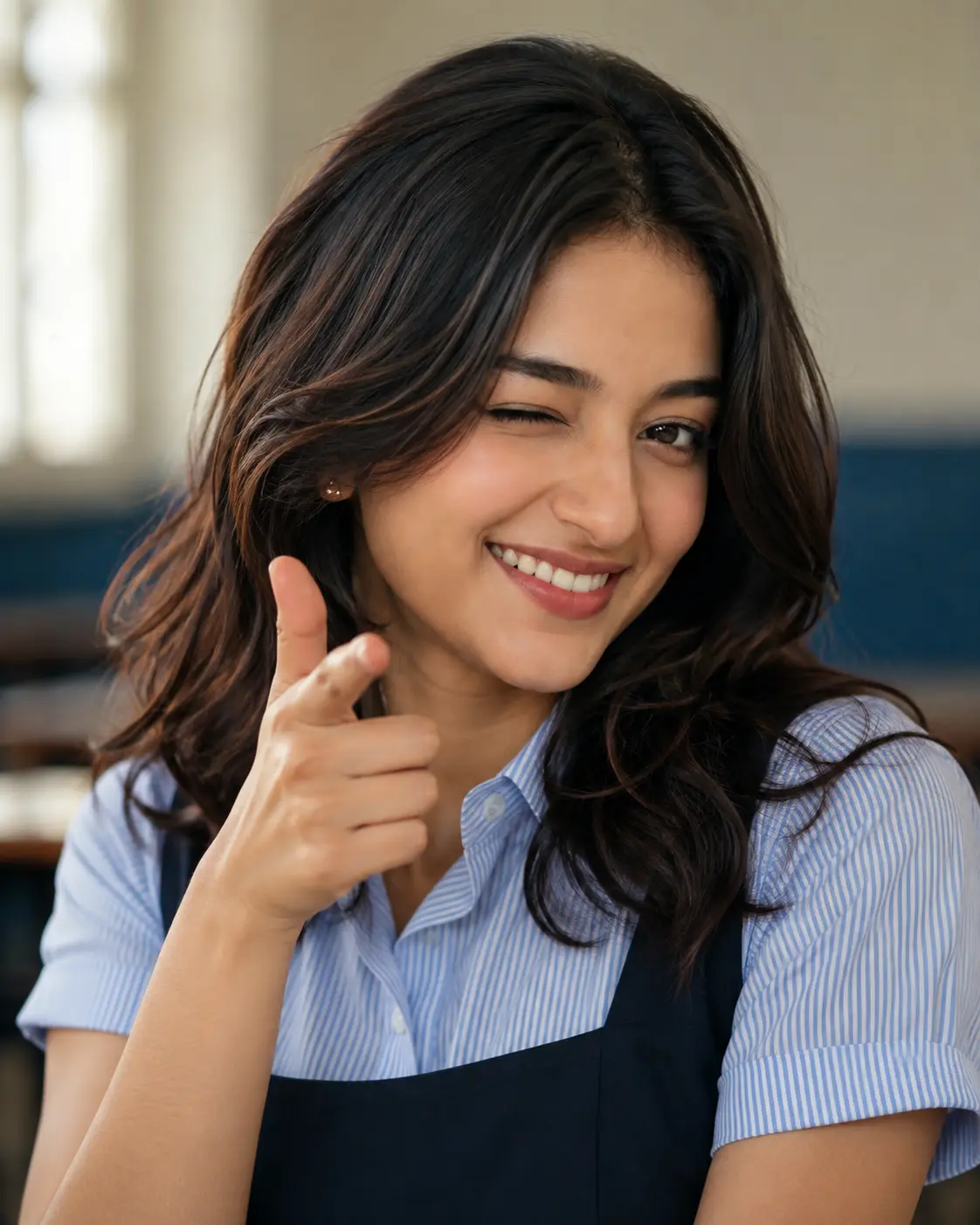
Playful Classroom Wink Portrait
Ultra-realistic, hyper-detailed close-up portrait of the same woman from the uploaded reference image. Preserve her facial identity with maximum accuracy (100% identity lock): identical face shape, forehead proportions, eyebrows, almond-shaped brown eyes, nose shape, lips, smile lines, jawline, chin, skin tone, skin texture, hairline, hairstyle, ear shape, and every unique facial characteristic. Do not beautify, alter, or reinterpret her identity in any way.She is captured in a candid, playful moment, winking with one eye while maintaining the exact facial proportions of the reference, wearing a joyful, genuine, wide smile with naturally visible teeth. Her right hand is raised near her face in a relaxed finger-gun gesture, with naturally curved fingers and a cheerful expression.She wears a light blue and white vertically striped short-sleeved collared school shirt beneath a dark navy pinafore dress. Her shoulder-length dark hair remains naturally voluminous with soft waves and subtle warm highlights, matching the reference. She wears the same delicate earrings and tiny bindi as seen in the reference.The setting is a bright, modern classroom with large windows softly diffused in the background. Shallow depth of field creates creamy cinematic bokeh while keeping the face and eyes perfectly sharp. Soft natural daylight illuminates her face evenly, producing realistic catchlights, accurate skin tones, and ultra-detailed skin texture without excessive smoothing.Photorealistic DSLR photography, 85mm portrait lens, f/1.8 aperture, cinematic color grading, HDR, 8K resolution, ultra-sharp eye focus, realistic skin pores, natural colors, premium editorial quality, authentic expression, highly detailed, lifelike.
Open with:
Also try in:
Did this prompt work for you?
Share this prompt
7
VIEWS
·
1
COPIES
·
1
LIKES

Log in to leave a comment.
More Like This
See all →
How to use this prompt
Here’s a shortcut to “Playful Classroom Wink Portrait” — no prompt-writing experience required. Drop it in and adjust the details to make the result your own. This version leans on skin texture, which gives the result its character.
- Use the Copy button to copy the prompt text.
- Head to ChatGPT and start a new image.
- Set your preferred aspect ratio, then generate.
- Download the version you like and share it.
Tips & variations
- Replace the setting or background to repurpose the same prompt for a new theme.
- Tweak the camera/lens cue (“close-up”, “wide shot”) to control the framing.
- Name a colour palette to keep a series of images visually consistent.
Frequently asked questions
It generates a visual built around skin texture — part of our Image AI Prompts collection. Use it as-is or as a starting point you customise to taste.
The way it handles skin texture is fairly specific, so results tend to be more focused than a generic Image AI Prompts prompt.
Yes — treat it as a starting point. Once you have an output you like, you can feed it back in with a follow-up prompt to refine or extend it further.
AI models are non-deterministic, so results vary each run even with the same prompt. Generate a few times and pick your favourite, or lock a seed if your tool supports it.