
20
VIEWS
·
18
COPIES
·
2
LIKES
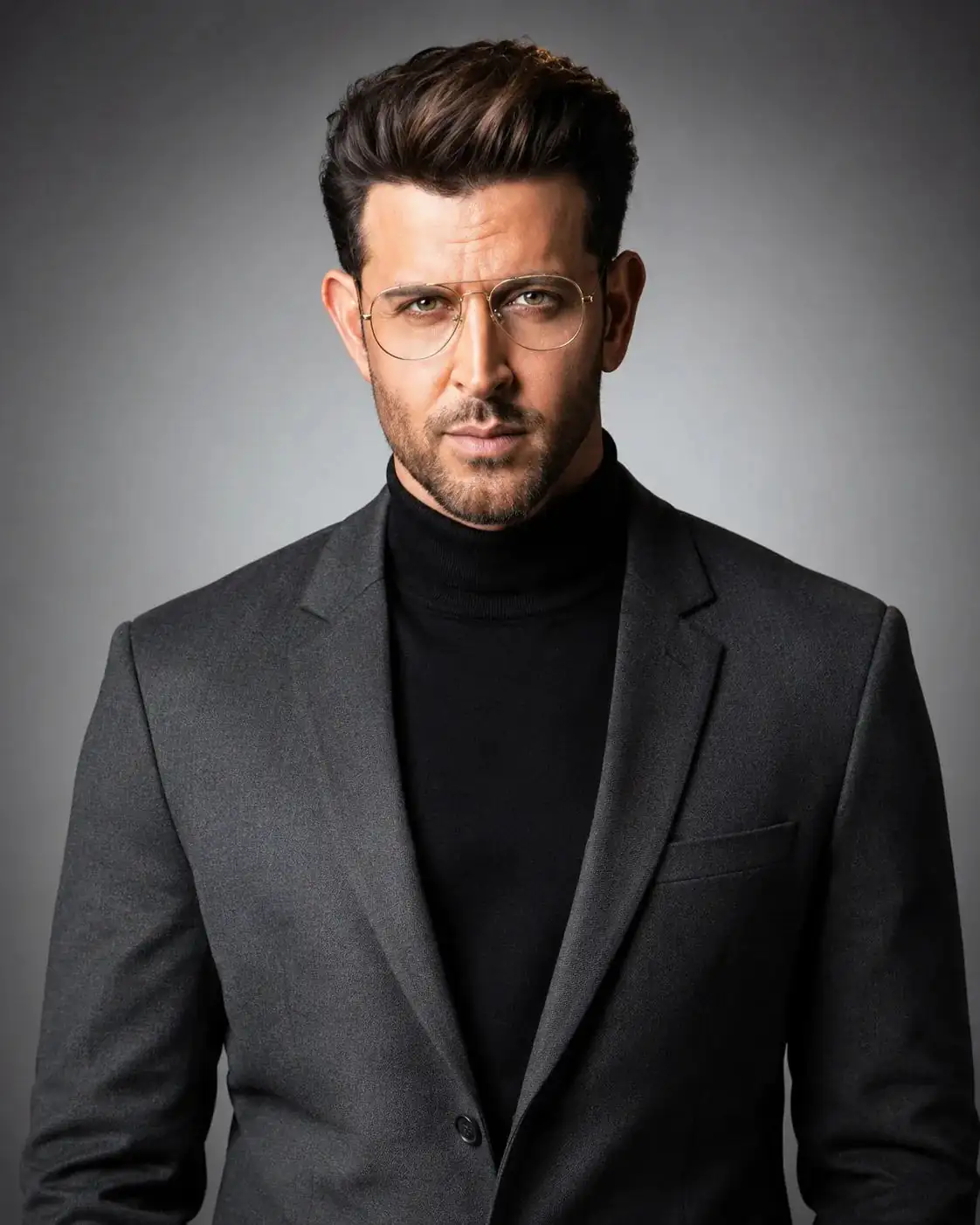
LinkedIn Portrait Prompt
steady eye contact, and balanced symmetrical posture. Keep the head straight, shoulders squared, and body facing forward with a polished executive presence.
Style him in a deep grey tailored blazer layered over a black high-neck turtleneck sweater, giving a modern luxury tech-leader look. Add thin gold-metal aviator eyeglasses with clear lenses, subtle realistic reflections on the glass, and crisp visible frame details. Preserve natural masculine facial character with neatly styled short textured hair, well-groomed facial hair, realistic skin pores, fine facial lines, subtle under-eye detail, and natural beard or stubble texture. Avoid plastic skin smoothing or artificial beauty retouching.
Use a minimalist studio background with a smooth gray gradient, lighter behind the subject and gradually darker toward the outer edges, creating a soft spotlight effect around him. Lighting should remain clean and professional but the overall image should have a distinctly high-contrast look, with stronger separation between highlights and shadows while preserving realistic skin tone and detail. Capture with a 70mm portrait lens, eye-level camera angle, shallow but controlled depth of field, sharp focus on the eyes and face, premium corporate branding style, high-end LinkedIn profile portrait aesthetic, crisp fabric texture on the blazer and turtleneck, ultra-realistic skin texture, clean professional color grading, editorial-quality finish, and a polished executive presence. Vertical portrait composition, 4:5 aspect ratio.
Open with:
Also try in:
Did this prompt work for you?
Share this prompt
20
VIEWS
·
18
COPIES
·
2
LIKES
Log in to leave a comment.
More Like This
See all →
How to use this prompt
Here’s a shortcut to “LinkedIn Portrait Prompt” — no prompt-writing experience required. Paste it into ChatGPT and you’ll get a detailed result in seconds. The specific phrasing around polished executive is doing most of the work here.
- Use the Copy button to copy the prompt text.
- Head to ChatGPT and start a new image.
- Set your preferred aspect ratio, then generate.
- Download the version you like and share it.
Tips & variations
- Replace the setting or background to repurpose the same prompt for a new theme.
- Tweak the camera/lens cue (“close-up”, “wide shot”) to control the framing.
- Change the lighting words (e.g. “golden hour”, “studio”, “moody”) to shift the whole mood.
Frequently asked questions
Yes — treat it as a starting point. Once you have an output you like, you can feed it back in with a follow-up prompt to refine or extend it further.
Edit the descriptive words in the prompt — change polished executive, the lighting, the colours or the setting. Small wording changes produce big differences in the final image.
The prompt is free, but commercial rights depend on the AI tool you generate with. Most paid plans allow commercial use — always check that specific tool’s licence and terms first.
Yes — every prompt on the site is free to copy and use. You only need an account with the AI tool you choose to run it.