
74
VIEWS
·
125
COPIES
·
1
LIKES
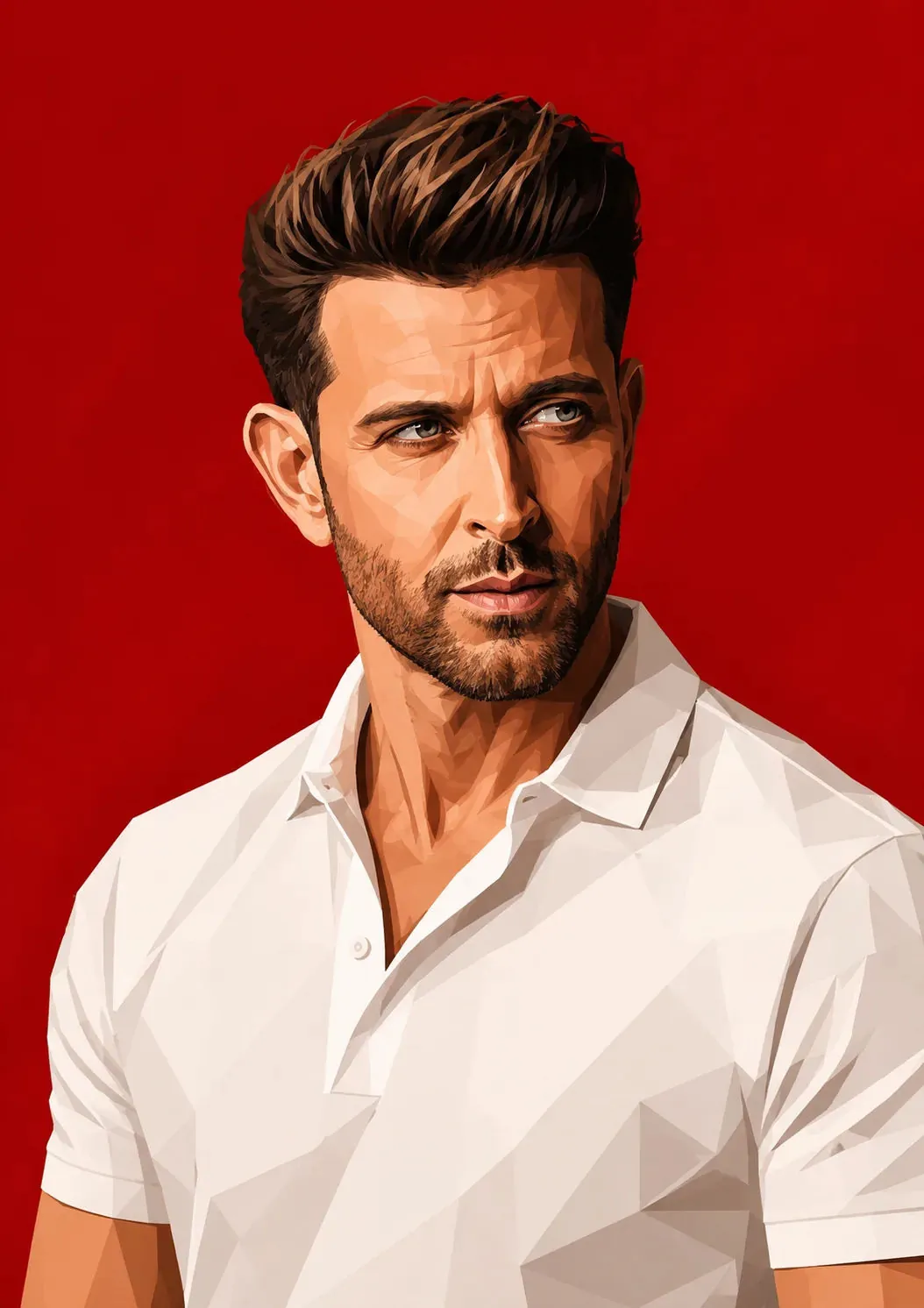
Geometric Vector Editorial Portrait
Create a highly detailed digital vector portrait illustration of a handsome man with a voluminous modern quiff hairstyle and a neatly trimmed short stubble beard. The subject is shown from the chest up in a three-quarter pose, turning his head slightly while looking off-camera to the right with a serious, thoughtful, and contemplative expression.
He is wearing a clean white polo shirt with a soft fabric texture and an open, unbuttoned collar that adds a relaxed yet sophisticated appearance. The composition emphasizes facial structure, sharp jawline, and expressive eyes.
Render the artwork in a bold low-poly vector illustration style using geometric polygonal shading, faceted surfaces, and sharp angular shadows. Use high-contrast editorial lighting with strong highlights and deep shadows to enhance depth and dimensionality across the face, hair, and clothing.
The background should be a smooth, vibrant solid crimson red with no additional objects or textures, creating a dramatic contrast against the white shirt and skin tones. Maintain a premium digital painting aesthetic with a modern magazine editorial feel, crisp edges, clean shapes, and professional poster-quality detail.
Style Keywords:
Low-poly vector art, geometric illustration, polygonal shading, editorial portrait, digital painting, high contrast lighting, modern portrait, crimson background, angular shadows, contemporary illustration, premium artwork, magazine cover aesthetic, sharp details, cinematic lighting.
Open with:
Also try in:
Did this prompt work for you?
Share this prompt
74
VIEWS
·
125
COPIES
·
1
LIKES
Log in to leave a comment.
More Like This
See all →
How to use this prompt
Copy “Geometric Vector Editorial Portrait” once and reuse it for endless variations in ChatGPT. Paste it into ChatGPT and you’ll get a detailed result in seconds. The specific phrasing around polygonal shading is doing most of the work here.
- Tap Copy above to grab the full prompt.
- Open ChatGPT (or any image AI like Midjourney, DALL·E 3 or Gemini).
- Paste the prompt into the generate box and run it.
- Like the result? Re-roll once or twice and keep your favourite.
Tips & variations
- Tweak the camera/lens cue (“close-up”, “wide shot”) to control the framing.
- Push or pull the polygonal shading elements specifically — that’s usually the fastest lever here.
- Replace the setting or background to repurpose the same prompt for a new theme.
Frequently asked questions
Edit the descriptive words in the prompt — change polygonal shading, the lighting, the colours or the setting. Small wording changes produce big differences in the final image.
Yes — treat it as a starting point. Once you have an output you like, you can feed it back in with a follow-up prompt to refine or extend it further.
Yes — every prompt on the site is free to copy and use. You only need an account with the AI tool you choose to run it.
The prompt is free, but commercial rights depend on the AI tool you generate with. Most paid plans allow commercial use — always check that specific tool’s licence and terms first.