
9
VIEWS
·
6
COPIES
·
0
LIKES
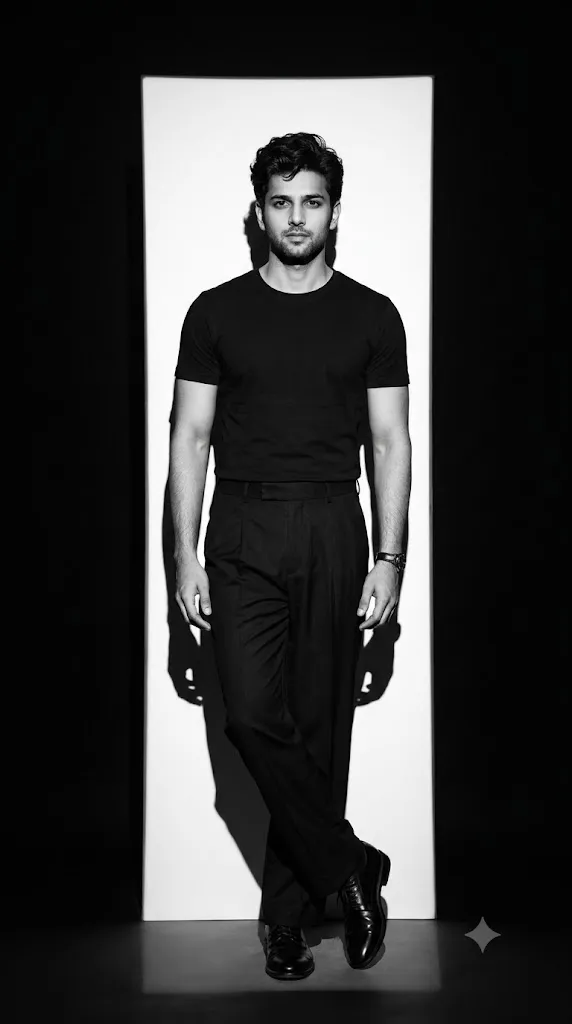
Monochrome Shadow — Timeless Fashion Portrait
Create a highly realistic, editorial black-and-white fashion portrait of a young South Asian man standing full-body in a minimalist studio. Match the reference composition, pose, proportions, lighting, wardrobe, and camera perspective as closely as possible.The man has thick, voluminous, slightly messy wavy black hair styled naturally upward and forward, a neatly groomed short beard and mustache, strong eyebrows, and a serious, confident expression while looking directly into the camera. He is wearing a plain fitted black crew-neck short-sleeve T-shirt, tucked into high-waisted loose black pleated trousers with a clean waistband and wide-leg silhouette. He wears black polished leather lace-up shoes and a dark wristwatch on his left wrist. No jewelry, no logos, no visible branding.His body is positioned straight toward the camera, relaxed posture, arms naturally hanging beside his body, with his legs crossed casually at the ankles, creating an elegant fashion-editorial stance. Full body visible from head to shoes.Set the scene inside a dark minimalist photography studio. Behind him is a tall, narrow vertical rectangular white light panel/background, extending almost from floor to above his head. The surrounding studio is deep black. A strong directional spotlight from the front creates dramatic, sharply defined shadows of the man's entire body cast onto the white panel/background, especially a distinct dark head-and-shoulder silhouette toward the left side.High-contrast monochrome black-and-white photography, deep blacks, bright white background, carefully controlled highlights on the face and arms, realistic skin texture, detailed hair strands, natural facial proportions, subtle fabric texture, realistic leather reflections on shoes, dramatic fashion-magazine aesthetic.Camera positioned approximately at eye/chest level, straight-on frontal composition, slightly long portrait-lens perspective, centered subject, symmetrical framing. Full-length fashion photograph with generous negative space around the subject. Vertical 9:16 composition, subject occupying approximately the central 65–70% of the frame. Sharp focus on the face and entire body, realistic depth, professional studio photography, cinematic contrast, crisp details, subtle film grain, premium luxury fashion editorial, sophisticated and moody atmosphere.No color, no text, no watermark, no logo, no extra people, no furniture, no props, no scenery, no distorted anatomy.Negative Prompt
color, colorful lighting, blue tint, warm tint, multiple people, duplicate person, extra arms, extra legs, malformed hands, extra fingers, missing fingers, distorted face, asymmetrical eyes, exaggerated muscles, cartoon, illustration, CGI, 3D render, plastic skin, blurry face, low resolution, oversaturated, busy background, furniture, props, text, captions, watermark, logo, brand names, incorrect shoes, shorts, jeans, jacket, patterned shirt, smiling expression, sitting pose
Open with:
Share this prompt
9
VIEWS
·
6
COPIES
·
0
LIKES

Log in to leave a comment.
More Like This
See all →
How to use this prompt
“Monochrome Shadow — Timeless Fashion Portrait” is a ready-to-use Image AI Prompts prompt built for Gemini. It works just as well in Midjourney, DALL·E 3 or Gemini, so you’re not locked into one tool.
- Grab the prompt with the Copy button at the top.
- Paste it into Gemini.
- Run it, focusing on his body if you want to steer the result.
- Regenerate to explore a few different takes on the same idea.
Tips & variations
- Push or pull the his body elements specifically — that’s usually the fastest lever here.
- Save a version you like as a template, then only edit the subject line each time.
- Swap the main subject for your own to completely change the scene while keeping the style.
Frequently asked questions
AI models are non-deterministic, so results vary each run even with the same prompt. Generate a few times and pick your favourite, or lock a seed if your tool supports it.
It’s set up for Gemini, and it also works well in Midjourney, DALL·E 3 or Gemini. Image models vary, so try the same prompt in a couple of tools and keep the result you like best.
Edit the descriptive words in the prompt — change his body, the lighting, the colours or the setting. Small wording changes produce big differences in the final image.
The prompt is free, but commercial rights depend on the AI tool you generate with. Most paid plans allow commercial use — always check that specific tool’s licence and terms first.