
7
VIEWS
·
2
COPIES
·
0
LIKES
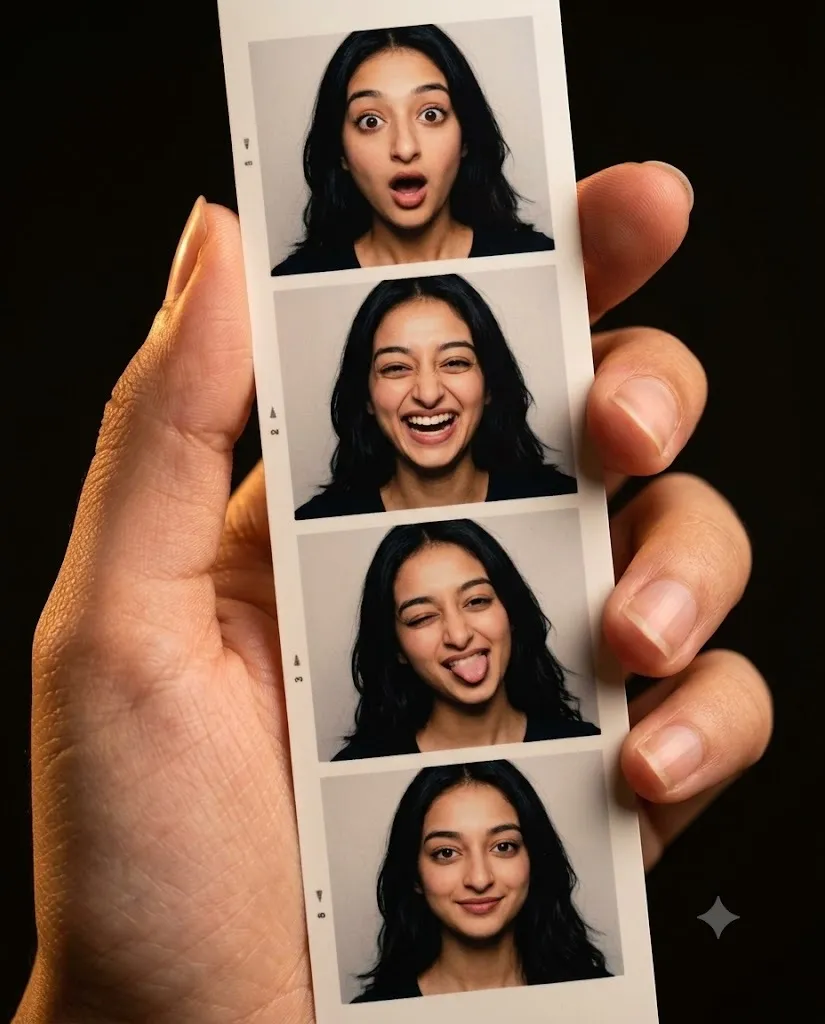
Handheld Photo Booth Memories
This image is a detailed macro shot focused on a human hand holding a vertical photo booth strip. The background is completely dark, creating a strong contrast that draws immediate attention to the realistic print. Warm, soft lighting illuminates the side of the hand, highlighting skin texture, subtle lines, and natural details around the fingers.The photo strip features four individual portrait frames displaying the female model's exact facial features, dark wavy hair, and skin tone from the reference photo. Across the vertical arrangement, her facial expressions change dynamically from panel to panel, maintaining perfect visual consistency and identity match while wearing a simple black top in each frame.Positioned in a 4:5 vertical format, the hand firmly grips the left edge of the printed strip. The four frames capture distinct emotional reactions sequentially: top frame showing wide-eyed surprise, second frame displaying open-mouthed laughter, third frame revealing a playful winking expression with tongue out, and bottom frame finishing with a gentle, relaxed smile.The illumination combines studio-style lighting within the mini photo frames and warm ambient light on the hand. A sharp depth of field ensures the photo strip remains crisp and detailed, while the background fades into deep shadow. The color palette pairs natural skin tones with the neutral off-white paper of the photo strip.Captured with macro lens precision, the image emphasizes fine textures, from individual hair strands and detailed irises to realistic paper edges and subtle print grain. The focus remains locked on the photos and skin details, avoiding synthetic smoothing to maintain an authentic, high-resolution aesthetic with clean borders and natural catchlights in the eyes.
Open with:
Share this prompt
7
VIEWS
·
2
COPIES
·
0
LIKES

Log in to leave a comment.
More Like This
See all →
How to use this prompt
“Handheld Photo Booth Memories” packages the descriptive detail an image model needs into one prompt. It’s tuned to give a repeatable, high-detail image you can refine. What sets this one apart is how it handles detailed macro.
- Grab the prompt with the Copy button at the top.
- Paste it into Gemini.
- Run it, focusing on detailed macro if you want to steer the result.
- Regenerate to explore a few different takes on the same idea.
Tips & variations
- Replace the setting or background to repurpose the same prompt for a new theme.
- Name a colour palette to keep a series of images visually consistent.
- Append quality modifiers like “highly detailed, 8k, sharp focus” for a cleaner render.
Frequently asked questions
Yes — every prompt on the site is free to copy and use. You only need an account with the AI tool you choose to run it.
AI models are non-deterministic, so results vary each run even with the same prompt. Generate a few times and pick your favourite, or lock a seed if your tool supports it.
The way it handles detailed macro is fairly specific, so results tend to be more focused than a generic Image AI Prompts prompt.
It’s set up for Gemini, and it also works well in Midjourney, DALL·E 3 or Gemini. Image models vary, so try the same prompt in a couple of tools and keep the result you like best.