
57
VIEWS
·
51
COPIES
·
3
LIKES
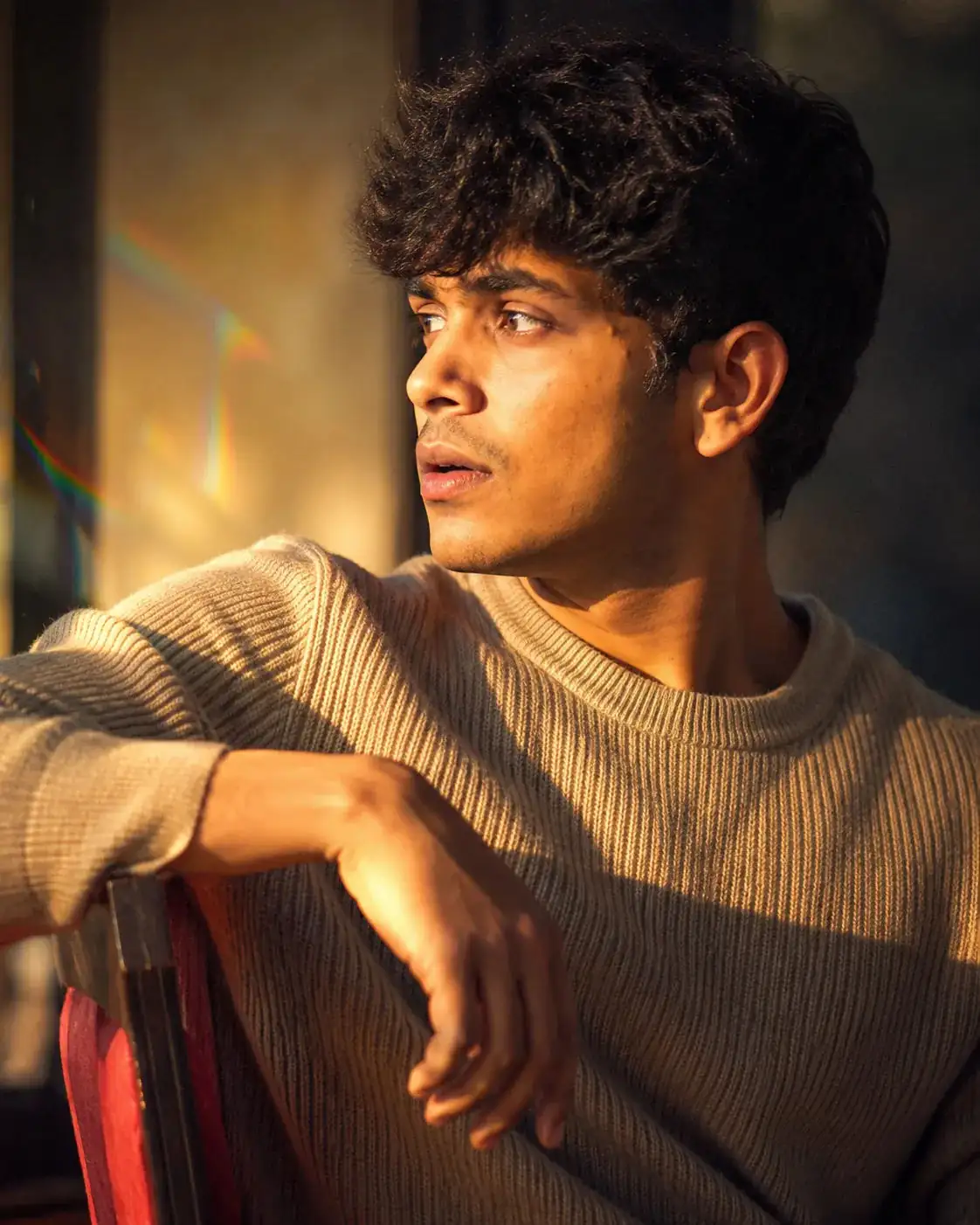
Dreamy Cinematic Side Profile Shot
I have added my selfie, keep 100% facial accuracy. Pose me and dress me according to scene, no not alter facial features.I am facing opposite to light with my body but turned backwards to look towards sunlight, in such a way, that My front side ( not back) of body is visible as if I was sitting on a chair, facing my back towards sun but I turned my body, with one hand placed on chair's back, supporting my elbow, to pose ...and then gazing the sun ,which casts orange sunshine on my face, and makes me basking in the sun, i am wearing beige knitware sweater and the shot skin texture, hairs and details are super crisp The image is Close-up shot , side face, and slightly at an angle. The harsh sunlight creates an interplay of light parts in sunshine, highlighted parts with yellow orange hue, and dark parts with brown and blue hues. It looks very ethereal, dreamy, nostalgic at 10x Optical Zoom of a 50-250mm Prime lens used with a mirrorless camera. There is slight prism like reflections casted on back wall due to glass refraction. There is very Subtle calm yet confident and bold look on face. The Photo has slight Glass filter effect with some light patches ( very subtle with soft edges) and Grains, to create a Hyper-realistic yet retro-futuristic look.
Open with:
Share this prompt
57
VIEWS
·
51
COPIES
·
3
LIKES

Log in to leave a comment.
More Like This
See all →






How to use this prompt
“Dreamy Cinematic Side Profile Shot” is a ready-to-use Image AI Prompts prompt built for Gemini. Paste it into Gemini and you’ll get a detailed result in seconds. The specific phrasing around very subtle is doing most of the work here.
- Grab the prompt with the Copy button at the top.
- Paste it into Gemini.
- Run it, focusing on very subtle if you want to steer the result.
- Regenerate to explore a few different takes on the same idea.
Tips & variations
- Append quality modifiers like “highly detailed, 8k, sharp focus” for a cleaner render.
- Change the lighting words (e.g. “golden hour”, “studio”, “moody”) to shift the whole mood.
- Tweak the camera/lens cue (“close-up”, “wide shot”) to control the framing.
Frequently asked questions
The prompt is free, but commercial rights depend on the AI tool you generate with. Most paid plans allow commercial use — always check that specific tool’s licence and terms first.
AI models are non-deterministic, so results vary each run even with the same prompt. Generate a few times and pick your favourite, or lock a seed if your tool supports it.
Edit the descriptive words in the prompt — change very subtle, the lighting, the colours or the setting. Small wording changes produce big differences in the final image.
No — the prompt itself works on free tiers of Gemini. A paid plan may unlock faster generation, higher limits, or commercial licensing, depending on the tool.