
10
VIEWS
·
12
COPIES
·
2
LIKES
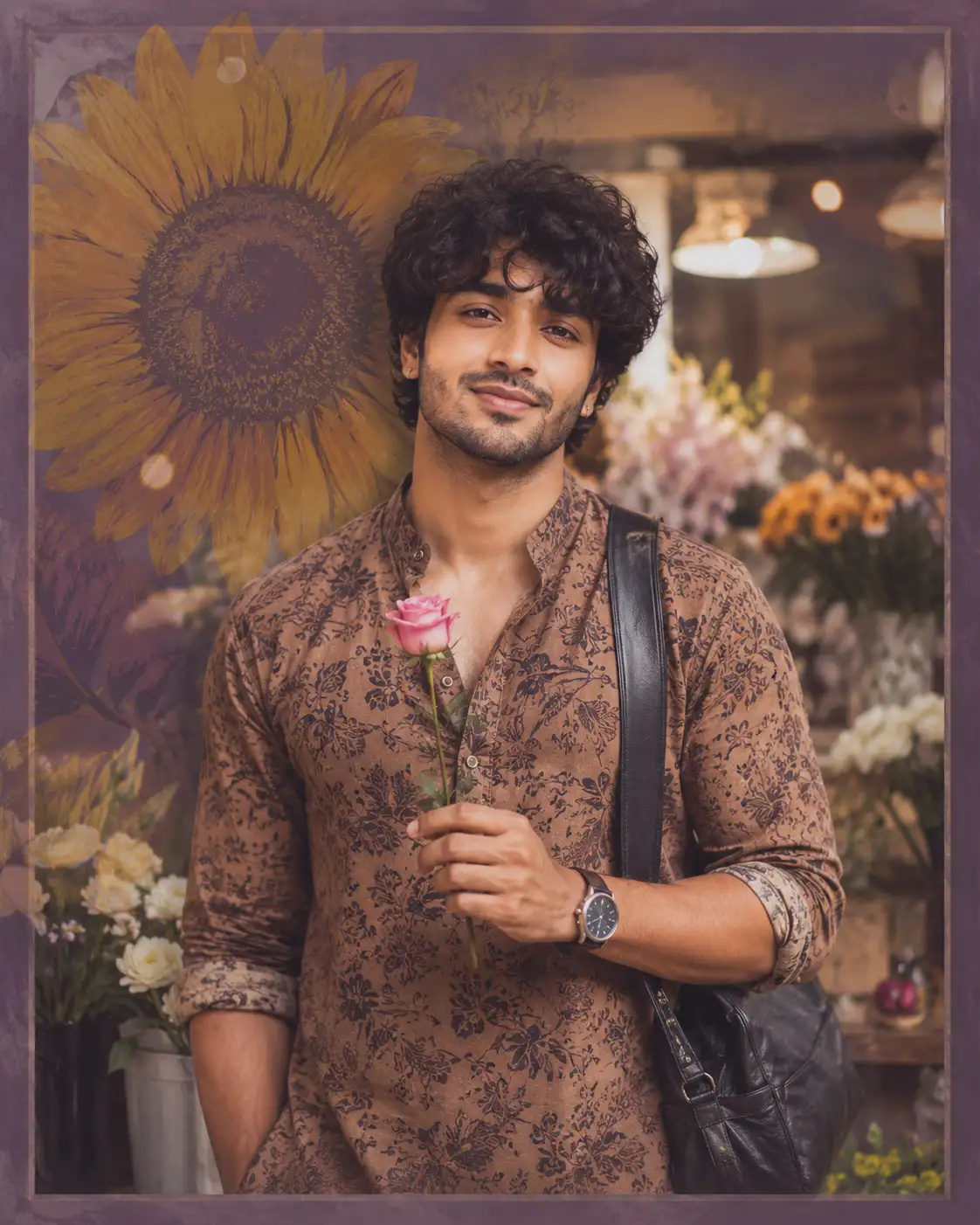
Flower Shop Portrait with Absolute Face Identity Lock
Use the uploaded reference image as the only facial identity reference. Preserve 100% facial resemblance without any alteration. Maintain the exact face shape, forehead proportions, eyebrows, almond-shaped deep brown eyes, eyelids, eye spacing, nose structure, nostrils, lips, smile, cheekbones, jawline, chin, ears, skin tone, facial proportions, hairline, and every unique facial feature exactly as in the reference. Do not beautify, stylize, age, de-age, feminize, masculinize, or modify the person's identity in any way. The final image must unmistakably depict the same individual with perfect identity consistency.
Create an ultra-realistic 8K cinematic portrait of the same young Indian man in his mid-20s with naturally messy curly black bedhead hair, a short natural stubble beard, and no glasses. He wears an earthy-toned traditional block-print kurta with the sleeves casually rolled up, a classic wristwatch, and a black leather crossbody bag resting on one shoulder. He gently holds a single fresh pink rose while standing inside a cozy flower shop filled with colorful floral arrangements. Warm golden pendant lights create a dreamy bokeh background with a shallow depth of field. Behind him, a large artistic sunflower mural appears as a subtle muted purple-tinted overlay inside a vintage-style photo frame effect. He looks directly into the camera with a calm, confident smile. Soft cinematic golden-hour lighting enhances realistic skin texture, natural fabric details, lifelike hair strands, and crisp facial features. Professional editorial fashion photography, 85mm lens, f/1.8 aperture, HDR, ultra-detailed, photorealistic, premium color grading, masterpiece quality.
Open with:
Share this prompt
10
VIEWS
·
12
COPIES
·
2
LIKES

Log in to leave a comment.
More Like This
See all →
How to use this prompt
This prompt turns one click into a finished “Flower Shop Portrait with Absolute Face Identity Lock” visual in ChatGPT. Generate, tweak a few words, and re-roll until it’s exactly right.
- Use the Copy button to copy the prompt text.
- Head to ChatGPT and start a new image.
- Set your preferred aspect ratio, then generate.
- Download the version you like and share it.
Tips & variations
- Replace the setting or background to repurpose the same prompt for a new theme.
- Tweak the camera/lens cue (“close-up”, “wide shot”) to control the framing.
- Try the prompt with and without the style words to see how much they’re actually doing.
Frequently asked questions
Yes — every prompt on the site is free to copy and use. You only need an account with the AI tool you choose to run it.
It’s set up for ChatGPT, and it also works well in Midjourney, DALL·E 3 or Gemini. Image models vary, so try the same prompt in a couple of tools and keep the result you like best.
Yes — treat it as a starting point. Once you have an output you like, you can feed it back in with a follow-up prompt to refine or extend it further.
The way it handles uploaded reference is fairly specific, so results tend to be more focused than a generic Image AI Prompts prompt.