
19
VIEWS
·
8
COPIES
·
2
LIKES
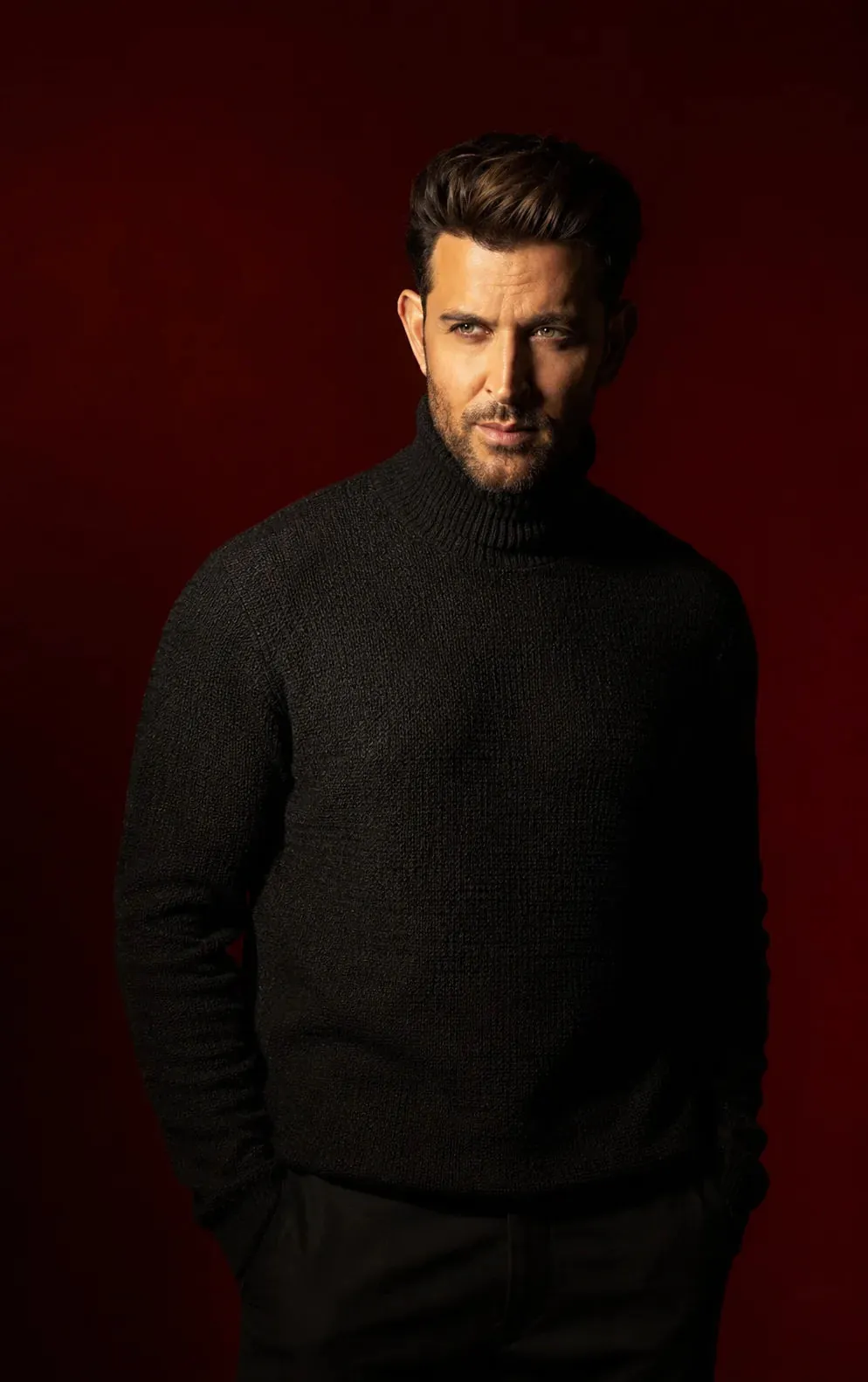
Cinematic Side-Lit Portrait in Black Textured Turtleneck
avoiding a perfectly straight passport-style pose.
The subject is wearing a black textured turtleneck sweater. The fabric should not appear flat — it must show subtle texture and natural highlights where light falls. The background is a smooth deep red gradient, clean and minimal.
Lighting is directional and controlled from the upper side at an angle. It creates a focused band of light across one side of the face, illuminating the eye, nose bridge, cheek, and part of the forehead. The light should have soft edges and natural spread, not too thin and not covering the full face.
Some light should gently fall onto the neck and upper chest so the clothing texture remains visible. The opposite side of the face stays in shadow, but not completely black — low-light details should still be visible. A very subtle red ambient bounce from the background adds slight separation.
Skin texture should be natural and detailed, with visible pores and realistic imperfections. Hair and beard should have clean detail where light hits. The overall look should feel like a high-end cinematic portrait with controlled contrast and natural depth.
Shot with an 85mm portrait lens, f/4 aperture, ISO 100, sharp focus, smooth background blur.
Negative prompt: close-up face crop, extreme zoom, head tilt, tilted composition, passport photo, flat lighting, evenly lit face, very thin light strip, full face lighting, beauty lighting, front flash, multiple light sources, plastic skin, no texture, stiff pose
Open with:
Share this prompt
19
VIEWS
·
8
COPIES
·
2
LIKES
Log in to leave a comment.
More Like This
See all →
How to use this prompt
Here’s a shortcut to “Cinematic Side-Lit Portrait in Black Textured Turtleneck” — no prompt-writing experience required. It’s tuned to give a repeatable, high-detail image you can refine. What sets this one apart is how it handles light should.
- Use the Copy button to copy the prompt text.
- Head to ChatGPT and start a new image.
- Set your preferred aspect ratio, then generate.
- Download the version you like and share it.
Tips & variations
- Push or pull the light should elements specifically — that’s usually the fastest lever here.
- Tweak the camera/lens cue (“close-up”, “wide shot”) to control the framing.
- Append quality modifiers like “highly detailed, 8k, sharp focus” for a cleaner render.
Frequently asked questions
No — the prompt itself works on free tiers of ChatGPT. A paid plan may unlock faster generation, higher limits, or commercial licensing, depending on the tool.
The way it handles light should is fairly specific, so results tend to be more focused than a generic Image AI Prompts prompt.
It generates a visual built around light should — part of our Image AI Prompts collection. Use it as-is or as a starting point you customise to taste.
Edit the descriptive words in the prompt — change light should, the lighting, the colours or the setting. Small wording changes produce big differences in the final image.