
204
VIEWS
·
155
COPIES
·
2
LIKES
·
2
TODAY
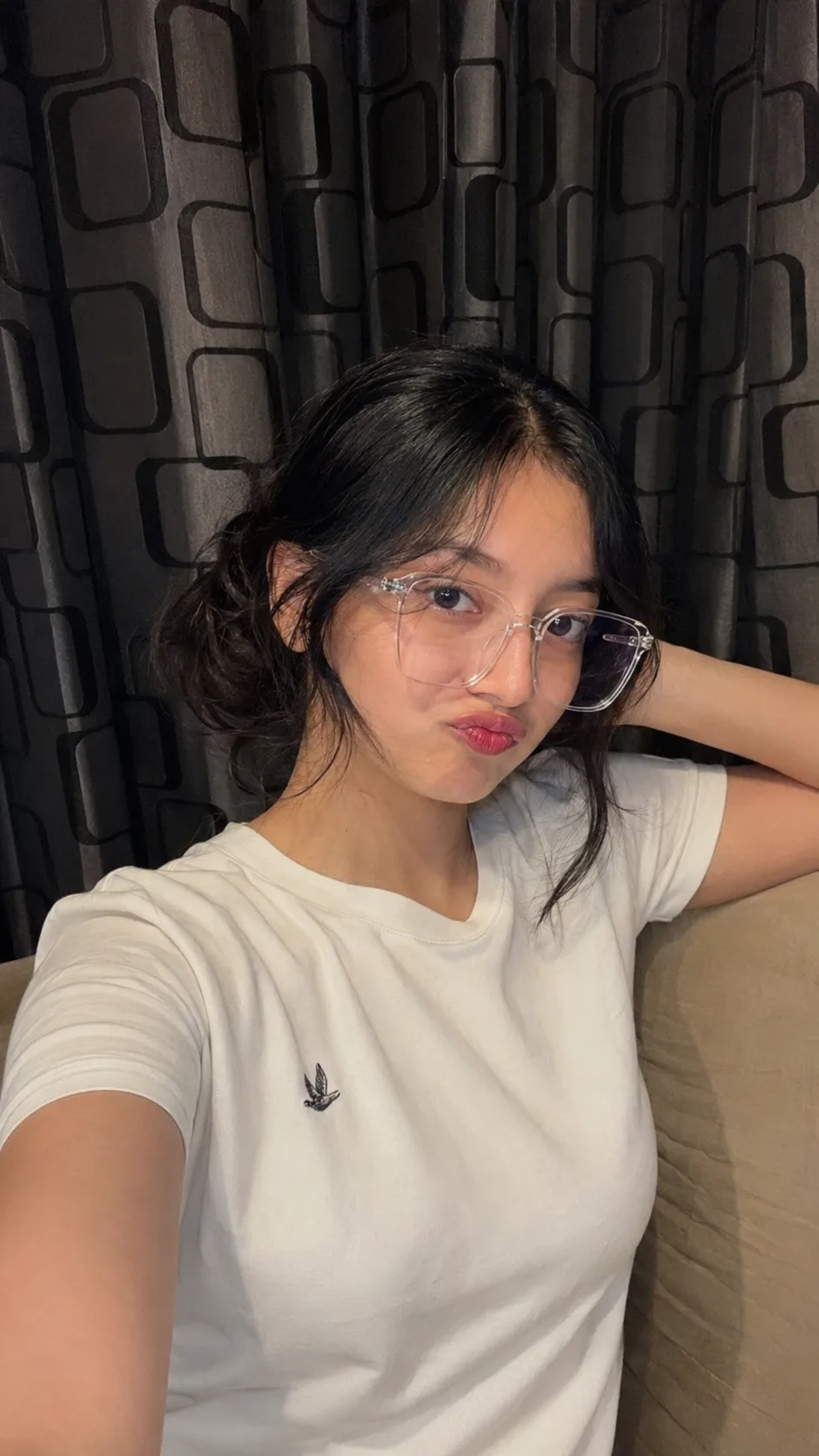
Casual Girl Selfie with Transparent Glasses
Use the uploaded reference image as the ONLY facial identity source and preserve the exact facial identity, facial structure, proportions, expression style, skin tone, hairstyle, and all unique facial characteristics of the person in the reference image. The final image must remain instantly recognizable as the same person from the uploaded photo. Do not alter facial anatomy, eye shape, nose shape, lips, jawline, cheek structure, forehead proportions, hairline, or skin complexion.Create an ultra-realistic smartphone selfie photograph in a vertical 9:16 aspect ratio.The subject is indoors, framed from the chest up, captured from a slightly elevated front-camera angle typical of a handheld smartphone selfie. She is making a playful duck-face/pout expression while looking directly into the camera.Face and Identity Preservation:
- Maintain the exact facial identity from the uploaded image.
- Preserve the same eye shape, eyelid structure, eyebrow thickness and curve, nose proportions, lip shape, smile lines, cheek contours, jawline, chin shape, and facial symmetry.
- Preserve the natural skin texture and complexion from the reference image.
- No beautification filters or facial modifications.
- Keep the same youthful appearance and facial proportions.
- Keep the exact ethnicity and natural characteristics from the reference image.Hair:
- Black hair styled in a loose low messy bun.
- Center-parted hairstyle with soft wispy curtain bangs.
- A few curled strands fall naturally beside the cheeks.
- Natural hair texture with realistic flyaway strands.Clothing:
- Oversized transparent crystal-clear square eyeglasses with thin transparent rims.
- Plain white crew-neck T-shirt.
- Tiny embroidered bird logo on the left chest area.
- Left hand resting casually behind the head.Pose:
- Relaxed casual selfie pose.
- Head slightly tilted.
- Direct eye contact with the camera.
- Natural shoulder posture.Environment:
- Indoor bedroom or living room setting.
- Dark charcoal curtain in the background featuring a rounded-rectangle geometric pattern.
- Beige sofa or cushion visible in the lower-right portion of the frame.
- Cozy indoor atmosphere.Lighting:
- Warm ambient indoor lighting.
- Soft illumination from the smartphone screen.
- Slightly dim room with realistic shadow falloff.
- No harsh studio lighting.Camera and Composition:
- Smartphone front camera perspective.
- Mild wide-angle lens distortion typical of a front camera.
- Vertical portrait orientation (9:16).
- Chest-up framing.
- Subject positioned slightly right of center.
- Natural handheld composition.Image Quality:
- Hyper-realistic photography.
- Visible skin pores and natural skin texture.
- Subtle under-eye shadows and natural imperfections.
- Gentle background blur.
- Slight social-media filter softness.
- Very subtle RGB edge separation around glasses and hair.
- Light film grain.
- Realistic HDR color balance.
- Ultra-detailed 4K or 8K quality.
- Photographic realism with authentic smartphone processing artifacts.Negative Prompt:
different face, altered identity, changed ethnicity, different hairstyle, beauty filter, smooth plastic skin, heavy makeup, enlarged eyes, reshaped nose, modified lips, distorted facial features, asymmetrical face, warped glasses, extra fingers, duplicate limbs, duplicate hair strands, cartoon, anime, CGI, painting, illustration, over-sharpening, dramatic bokeh, studio lighting, overexposed highlights, oversaturated colors, watermark, text, captions, interface elements, cropped forehead, low resolution, blurry face.Generation Settings:
- Aspect Ratio: 9:16
- Photorealistic / RAW style
- CFG Scale: 5–7
- Steps: 30–40
- Seed: Random
- Identity Strength: Maximum
- Facial Consistency Priority: Highest
Open with:
Also try in:
Did this prompt work for you?
Share this prompt
204
VIEWS
·
155
COPIES
·
2
LIKES
·
2
USED TODAY
Log in to leave a comment.
More Like This
See all →
How to use this prompt
Here’s a shortcut to “Casual Girl Selfie with Transparent Glasses” — no prompt-writing experience required. It works just as well in Midjourney, DALL·E 3 or Gemini, so you’re not locked into one tool.
- Use the Copy button to copy the prompt text.
- Head to ChatGPT and start a new image.
- Set your preferred aspect ratio, then generate.
- Download the version you like and share it.
Tips & variations
- Save a version you like as a template, then only edit the subject line each time.
- Tweak the camera/lens cue (“close-up”, “wide shot”) to control the framing.
- Append quality modifiers like “highly detailed, 8k, sharp focus” for a cleaner render.
Frequently asked questions
It’s set up for ChatGPT, and it also works well in Midjourney, DALL·E 3 or Gemini. Image models vary, so try the same prompt in a couple of tools and keep the result you like best.
The prompt is free, but commercial rights depend on the AI tool you generate with. Most paid plans allow commercial use — always check that specific tool’s licence and terms first.
Yes — every prompt on the site is free to copy and use. You only need an account with the AI tool you choose to run it.
Yes — treat it as a starting point. Once you have an output you like, you can feed it back in with a follow-up prompt to refine or extend it further.