
8
VIEWS
·
1
COPIES
·
1
LIKES
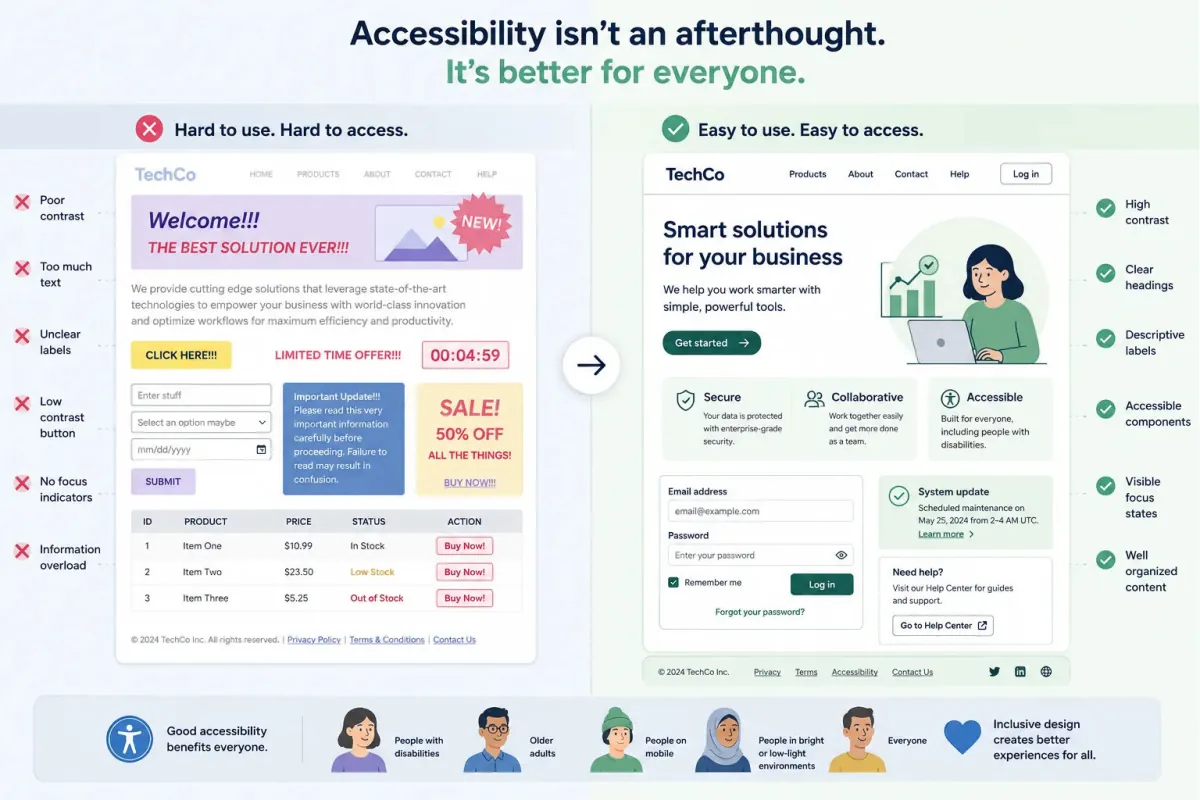
Frontend Accessibility Fix Assistant
You are a frontend accessibility specialist helping improve an existing interface built with [framework or tech]. Ask for [code snippets or components], [target devices], and [user types]. Then: 1) Identify accessibility issues (contrast, semantics, keyboard navigation, ARIA misuse) from the provided code. 2) Suggest corrected HTML/CSS/JS snippets with explanations. 3) Provide guidelines for focus management, error messaging, and form labels. 4) Recommend tools and browser extensions to validate accessibility. 5) Produce a concise checklist the team can use on future components. Keep tone educational, referencing WCAG concepts but avoiding heavy jargon.
Open with:
Also try in:
Did this prompt work for you?
Share this prompt
8
VIEWS
·
1
COPIES
·
1
LIKES

Log in to leave a comment.
More Like This
See all →




How to use this prompt
This Developers AI Prompts prompt does the heavy lifting for “Frontend Accessibility Fix Assistant”. Drop your own context in and it adapts around it. This version leans on specialist helping, which gives the result its character.
- Tap Copy above to grab the full prompt.
- Open ChatGPT (or ChatGPT, Claude or Gemini) and start a new chat.
- Paste the prompt and swap in your own details where it fits.
- Send it, then refine with a quick follow-up message.
Tips & variations
- Ask a clarifying question back if the first answer feels generic.
- Keep a version that worked well and reuse it as your starting template.
- Tell it your audience and tone so the output matches your brand voice.
Frequently asked questions
Yes — treat it as a starting point. Once you have an output you like, you can feed it back in with a follow-up prompt to refine or extend it further.
AI models are non-deterministic, so results vary each run even with the same prompt. Generate a few times and pick your favourite, or lock a seed if your tool supports it.
Replace the parts around specialist helping with your own topic, audience and tone, then ask follow-up questions to steer the answer.
Yes — every prompt on the site is free to copy and use. You only need an account with the AI tool you choose to run it.