
12
VIEWS
·
13
COPIES
·
1
LIKES
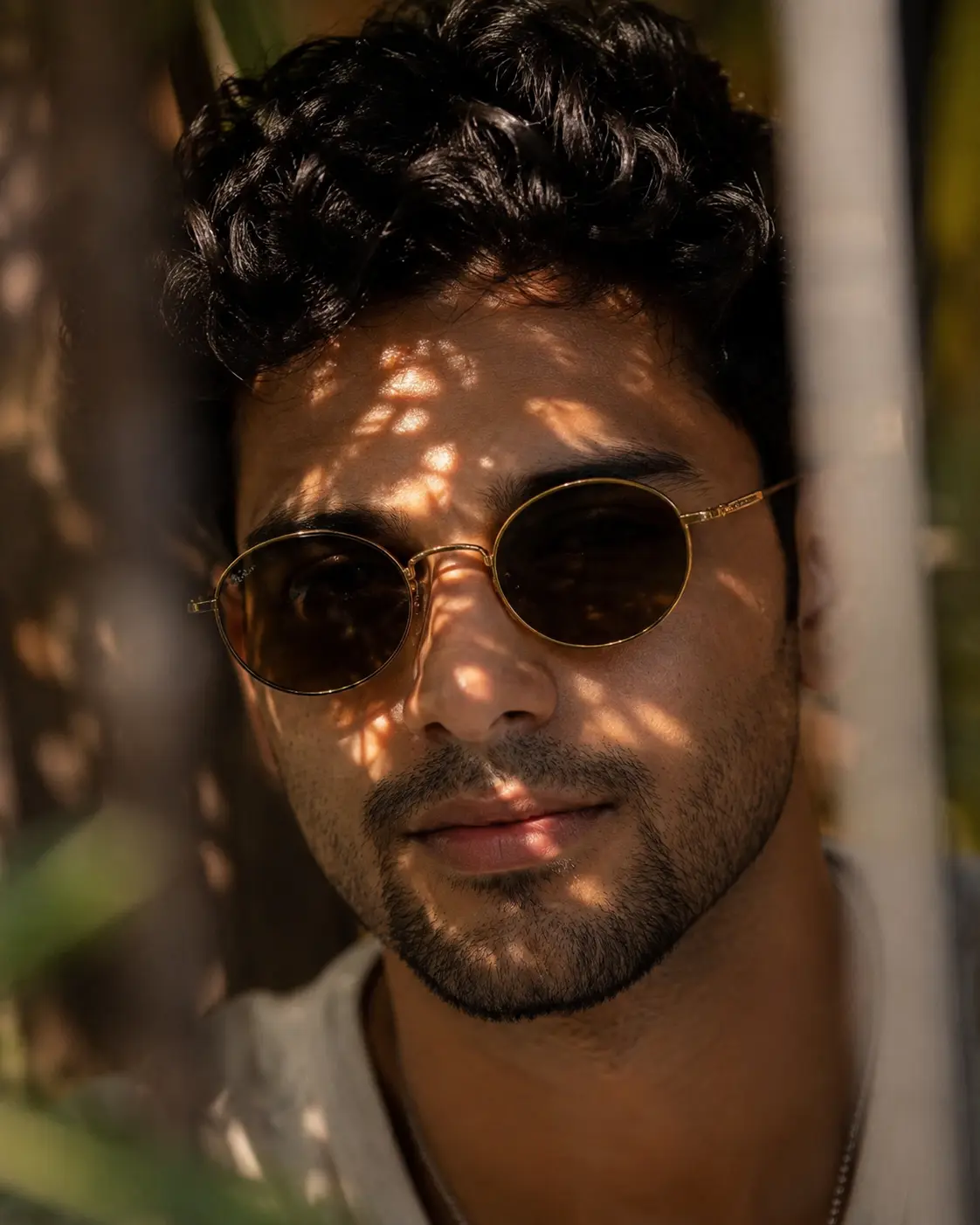
Leaf Shadow Portrait with Vintage Round Sunglasses
Use the uploaded reference image as the sole facial identity source. Preserve the subject's face with 100% accuracy, including facial structure, jawline, cheekbones, chin, forehead proportions, eye shape and spacing, eyebrows, nose, lips, ears, skin tone, natural complexion, hairline, hairstyle, and subtle facial features. Do not beautify, reshape, age, stylize, or alter the identity in any way.Create a hyper-realistic 8K close-up portrait of the same young man wearing vintage round metal-framed sunglasses with thin gold arms and dark lenses. Keep his natural dark hair, neatly styled with a slightly textured appearance, along with his light mustache and subtle goatee exactly as in the reference. He wears a clean, minimal outfit with only the upper neckline visible.The scene is illuminated by warm golden-hour sunlight, with dramatic dappled leaf shadows naturally falling across his forehead, cheeks, and nose. Include a shallow depth of field with soft blurred foreground vertical elements framing the portrait to create depth and cinematic realism. The background should be creamy, unobtrusive, and beautifully blurred with smooth bokeh.Capture the image with an 85mm f/1.4 lens, emphasizing ultra-sharp eyes, lifelike skin pores, natural facial texture, realistic reflections on the sunglasses, rich contrast, warm cinematic color grading, premium editorial composition, National Geographic-quality photography, octane render, HDR, photorealistic, ultra-detailed, 8K resolution.
Open with:
Share this prompt
12
VIEWS
·
13
COPIES
·
1
LIKES

Log in to leave a comment.
More Like This
See all →
How to use this prompt
Here’s a shortcut to “Leaf Shadow Portrait with Vintage Round Sunglasses” — no prompt-writing experience required. It’s tuned to give a repeatable, high-detail image you can refine. What sets this one apart is how it handles uploaded reference.
- Use the Copy button to copy the prompt text.
- Head to ChatGPT and start a new image.
- Set your preferred aspect ratio, then generate.
- Download the version you like and share it.
Tips & variations
- Try the prompt with and without the style words to see how much they’re actually doing.
- Add an aspect ratio that fits your platform — portrait for Instagram, wide for banners.
- Name a colour palette to keep a series of images visually consistent.
Frequently asked questions
Yes — every prompt on the site is free to copy and use. You only need an account with the AI tool you choose to run it.
Yes — treat it as a starting point. Once you have an output you like, you can feed it back in with a follow-up prompt to refine or extend it further.
The way it handles uploaded reference is fairly specific, so results tend to be more focused than a generic Image AI Prompts prompt.
AI models are non-deterministic, so results vary each run even with the same prompt. Generate a few times and pick your favourite, or lock a seed if your tool supports it.