
17
VIEWS
·
21
COPIES
·
3
LIKES
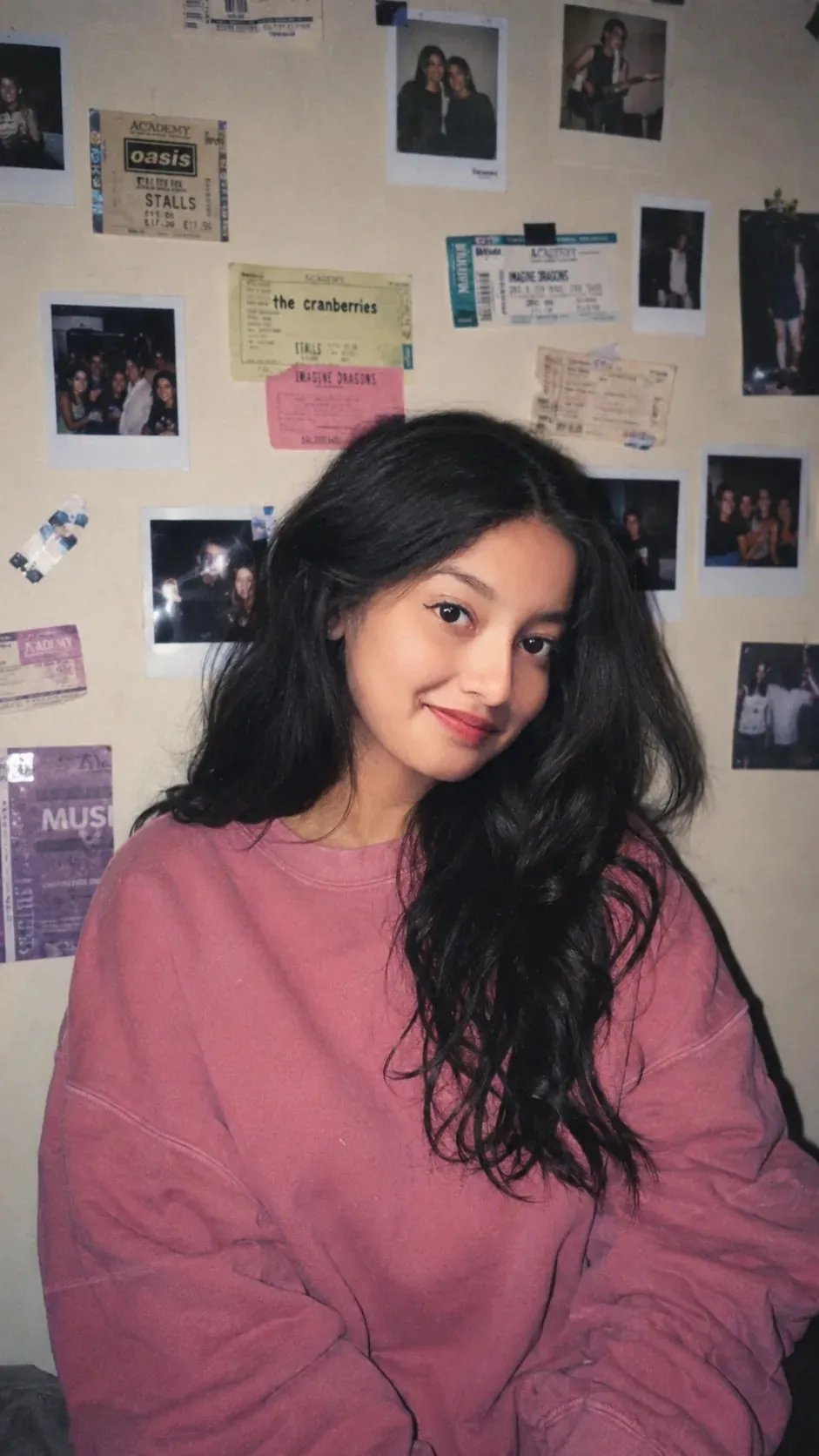
Portrait in Dusty Rose Sweatshirt
Use the uploaded reference image as the sole facial identity reference and preserve the same facial identity throughout the image generation process.Highest priority: facial identity preservation.Preserve the facial characteristics from the reference image:
• Same face shape and proportions
• Same jawline and chin structure
• Same eye shape, size, spacing, and eyelids
• Same nose shape and proportions
• Same lips, smile, and mouth shape
• Same eyebrow shape and placement
• Same skin tone and complexion
• Same hairline and natural facial features
• No beautification, stylization, age change, or reinterpretation
• Keep the face visually consistent with the uploaded reference imageScene:
A young woman with the same facial identity as the reference image, pale soft complexion, captured in an authentic 1990s disposable camera snapshot. Loose black hair naturally frames her face with a subtle smirk expression. She wears an oversized dusty rose crewneck sweatshirt with slightly bunched sleeves and a relaxed fit.Background:
A dim beige wall cluttered with Polaroid photographs, taped concert tickets, handwritten notes, and vintage memorabilia creating an authentic bedroom aesthetic.Photography style:
1990s disposable camera aesthetic, direct on-camera flash, flat shadows, slight overexposure on skin highlights, subtle film grain, soft color fading, realistic imperfections, candid snapshot composition, amateur film photography look, nostalgic atmosphere.Face preservation priority is higher than clothing, lighting, pose, or background details.
Open with:
Also try in:
Did this prompt work for you?
Share this prompt
17
VIEWS
·
21
COPIES
·
3
LIKES
Log in to leave a comment.
More Like This
See all →
How to use this prompt
Here’s a shortcut to “Portrait in Dusty Rose Sweatshirt” — no prompt-writing experience required. Drop it in and adjust the details to make the result your own. This version leans on reference image, which gives the result its character.
- Use the Copy button to copy the prompt text.
- Head to ChatGPT and start a new image.
- Set your preferred aspect ratio, then generate.
- Download the version you like and share it.
Tips & variations
- Add an aspect ratio that fits your platform — portrait for Instagram, wide for banners.
- Push or pull the reference image elements specifically — that’s usually the fastest lever here.
- Try the prompt with and without the style words to see how much they’re actually doing.
Frequently asked questions
Yes — every prompt on the site is free to copy and use. You only need an account with the AI tool you choose to run it.
Edit the descriptive words in the prompt — change reference image, the lighting, the colours or the setting. Small wording changes produce big differences in the final image.
The way it handles reference image is fairly specific, so results tend to be more focused than a generic Image AI Prompts prompt.
Yes — treat it as a starting point. Once you have an output you like, you can feed it back in with a follow-up prompt to refine or extend it further.