
27
VIEWS
·
10
COPIES
·
3
LIKES
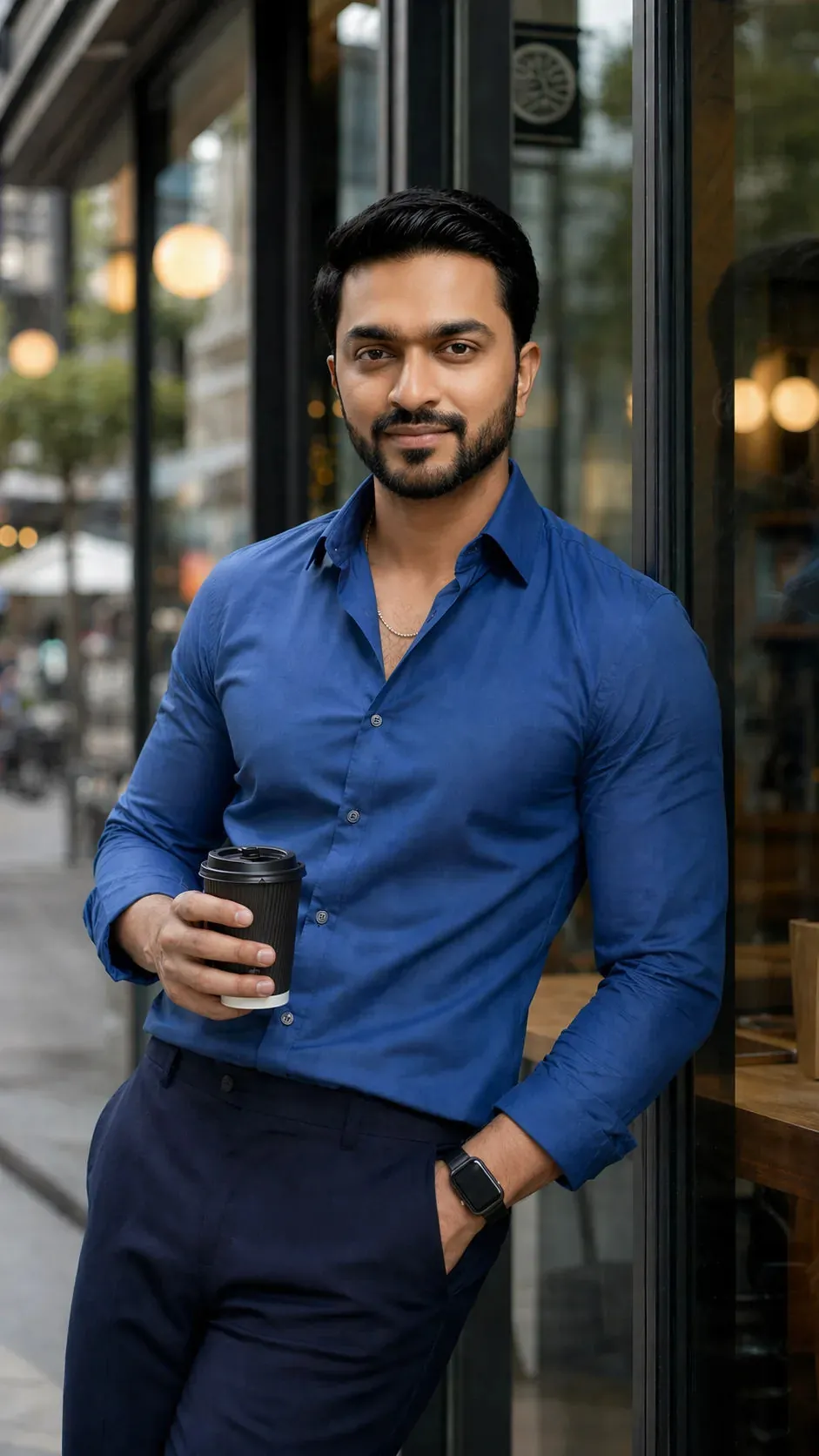
Man in blue
Use this image as reference and generate with below prompt:
{
"prompt": "Create a hyper-realistic vertical 9:16 portrait using the uploaded person's face. Preserve the exact identity, facial structure, skin tone, and natural features without alteration. The person is a confident young man standing outdoors, leaning casually against a modern glass wall (cafe exterior). He has a relaxed posture: one shoulder touching the glass, one hand in his trouser pocket, and the other holding a takeaway coffee cup. He wears a fitted blue button-down shirt (top buttons slightly open), dark navy tailored trousers, a minimal chain necklace, a black smart watch, and dark sunglasses.\n\nExpression is a subtle, confident closed-mouth smile. Head is near-frontal with a slight natural turn (10–15 degrees), no extreme angles.\n\nLighting is soft natural daylight from the front/side (45 degrees), evenly illuminating the face with no harsh shadows. Background shows a blurred urban street with warm indoor cafe lights visible through glass, creating cinematic bokeh.\n\nShot on a portrait lens (85mm look), shallow depth of field, ultra-sharp focus on the face, realistic skin texture, no over-smoothing. Maintain accurate proportions between head and body.\n\nEnsure the face blends seamlessly with the body, matching skin tone across face, neck, and hands. No distortion, no stylization, no cartoon effect.","size": "1024x1792","referenced_image_ids": [""],"style": "photorealistic","negative_prompt": "blurry face, distorted features, wrong skin tone, mismatched lighting, extra face, deformed eyes, over-smooth skin, cartoon, unrealistic proportions, strong shadows on face, wide-angle distortion"
}
Share this prompt
27
VIEWS
·
10
COPIES
·
3
LIKES

Log in to leave a comment.
More Like This
See all →
How to use this prompt
“Man in blue” packages the descriptive detail an image model needs into one prompt. It works just as well in Midjourney, DALL·E 3 or Gemini, so you’re not locked into one tool.
- Grab the prompt with the Copy button at the top.
- Paste it into ChatGPT.
- Run it, focusing on skin tone if you want to steer the result.
- Regenerate to explore a few different takes on the same idea.
Tips & variations
- Add an aspect ratio that fits your platform — portrait for Instagram, wide for banners.
- Name a colour palette to keep a series of images visually consistent.
- Save a version you like as a template, then only edit the subject line each time.
Frequently asked questions
No — the prompt itself works on free tiers of ChatGPT. A paid plan may unlock faster generation, higher limits, or commercial licensing, depending on the tool.
Yes — every prompt on the site is free to copy and use. You only need an account with the AI tool you choose to run it.
Edit the descriptive words in the prompt — change skin tone, the lighting, the colours or the setting. Small wording changes produce big differences in the final image.
It’s set up for ChatGPT, and it also works well in Midjourney, DALL·E 3 or Gemini. Image models vary, so try the same prompt in a couple of tools and keep the result you like best.